
All in One View
Content from What is unit testing?
Last updated on 2026-06-29 | Edit this page
Overview
Questions
- How do I know my code is correct?
- What is a unit test and how does it relate to how I already think about correctness?
Objectives
Explain what a unit test is in terms of inputs, expected outputs, and assertions
Connect the practice of unit testing to the scientific method and scientific integrity
Distinguish between verification and validation in the context of scientific software
Identify functions in their own code that would be candidates for unit testing
Distinguish between unit testing and other forms of verification such as running on known data
Connect the practice of testing to the scientific method.
Explain what a unit test is in terms of inputs and expected results.
Distinguish between a unit test and other forms of testing.
Why test?
Computers only do exactly what we tell them to, and we are fallible, so we should assume that mistakes, i.e. bugs, will happen. Scientists often fall into the trap of “I am smart, so my code must be correct.”, but software is no different to any other piece of experimental apparatus. We wouldn’t plug a new voltage sensor into a dark matter experiment and take data without testing it first (e.g. calibrating it), and we should follow the same procedure to verify and validate the behaviour of software used to produce scientific outputs:
- Verification: Confirm that the code implements a specific numerical technique or theoretical model correctly.
- Validation: Confirm that the code is “calibrated” against known existing data or independent calculations.
This is no more or less than applying the scientific method to software development, which aside from increasing confidence in our published results, also increases the time we can spend on research rather than tracking down bugs.
Still don’t think it’s important? There have been, and continue to be, retractions of papers due to unwitting software bugs, several of which are listed at danielskatz/errors-due-to-research-software.
That said testing is only a mitigation strategy, as we’ll see.
Types of testing
As we build up an experiment from components, so we do with software
in the form of units: functions, classes, and data
structures. For example, we might want a function to calculate the
invariant mass of a particle. Within the ccptepp-test/
directory, open up a new file in the test/ subdirectory
called test_invariant_mass.cpp. Let’s sketch out the
function as follows:
CPP
//! \file test_invariant_mass.cpp
#include <cmath>
#include <stdexcept>

double invariant_mass(double energy, double momentum)
{
   if (energy < 0)
   {
      throw std::domain_error("unphysical negative energy");
   }
   double mass_squared = energy*energy - momentum*momentum;
   if (mass_squared < 0)
   {
      throw std::domain_error("unphysical mass^2");
   }
   return std::sqrt(mass_squared);
}

int main()
{
   double photon_mass = invariant_mass(100,100);
}
At the lowest level in code is defensive
programming, which adds exceptions or checks into the function
itself to report or handle errors, in this case unphysical inputs like
energy < 0. We can try compiling this and running it
from the ccptepp-test/ directory as follows:
As written, test_invariant_mass is an example of a
smoke test, as is “run and see if it breaks”. As with
defensive programming though, this only checks exceptional
circumstances, not normal operation. This is where unit
testing comes in, where we verify that we get the
return value(s) we expect for given input(s) to a specific unit, here
the invariant_mass function, across its domain of
applicability.
Effectively unit testing is nothing more than the application of the scientific method to our code:
| Step | Scientific Method | Software Unit Testing |
|---|---|---|
| Hypothesis | I predict this physical system behaves like X. | I expect this function to return Y when given
X. |
| Experiment | Run a controlled trial isolating variables. | Run an isolated test passing known values of X into the
function. |
| Analysis | Check if the data matches the prediction. | Verify that the returned Y values matches the expected
results. |
| Iteration | Update the theory based on anomalies. | Fix any code bugs exposed by failing verification. |
| Reproducibility | Independent experiments should reach the same conclusion. | Re-running the tests should always give the same result |
Of course, software consists of many units, so unit testing is only part of the story:
| Scientific Stage | Experimental Stage | Software Stage | Testing Type |
|---|---|---|---|
| Isolating Variables | Calibrating a single voltage sensor. | Testing a single C++ function with hardcoded inputs. | Unit Testing |
| Assembling Apparatus | Hooking voltage, light sensors to the electronics crates and ensuring data flows across the system. | Verifying that the I/O, kinematics, and histogramming code work together. | Integration Testing |
| Reproducibility | Modifying a detector component and verifying it still reproduces last week’s baseline calibration. | Modifying code for speed or features, then ensuring it still yields identical results in a known test. | Regression Testing |
Layering Tests for Defense
Imagine you are working in a major physics collaboration. Below are three critical software failures that could happen during running:
- A: A minus sign is changed to a plus sign in a coordinate transformation function. Now, whenever a particle travels in the negative z-direction, its position is completely wrong.
- B: A multi-threaded track fitting loop is optimized to run 4x faster. The code runs smoothly, but it subtly truncates the decimal precision of track parameters, shifting your final calculated Higgs mass peak by 2 GeV compared to last year’s published configuration.
- C: Your kinematic calculator works perfectly in isolation, as does your file-reader isolation. However, when combined, the file-reader outputs data in single-precision floats, but the calculator expects double-precision arrays, causing a segmentation fault.
Question: Match each failure to the specific testing layer (Unit, Integration, or Regression) that acts as the primary shield to catch it before you submit a paper.
Layers provide defense in depth:
- A is caught by a Unit Test: You can catch this immediately by passing a single, known four-vector with a negative z-value into that specific function and checking the output against a hand-calculation.
- B is caught by a Regression Test: This requires running a benchmark “control dataset” through the new optimized code and asserting that the output physics distributions perfectly overlap with your historical baseline data.
- C is caught by an Integration Test: Neither individual unit test will catch this because both pieces work fine alone. You only see the type mismatch when running the components together.
Integration tests are often the “gold standard” especially for scientific codes as these validate against actual experimental data and thus much focus is put on them. However, their higher level nature means that if a problem is identified, triaging where in the code caused this, and more importantly why, may involve a lot of work if there are no unit or regression tests to provide a guide.
Unit and integration tests are themselves regression tests when they are written. As bugs, inevitably, are identified, new unit or integration tests are written to:
- Reproduce the bug and cause a failure.
- Provide tests that developers can use to help identify the bug and fix it.
- These tests are retained in the codebase to avoid the regression again in the future.
This course will focus on unit testing as a foundation for testing scientific software, but don’t forget about the other types!
- Testing is formalising what you already do informally when you verify your code
- Verification confirms that code implements a model correctly; validation confirms the model describes nature correctly — unit testing addresses verification
- Unit tests check that a single function produces the expected output for a given input
- Integration tests make sure that code units work together properly.
- Regression tests ensure that everything works the same today as it did yesterday.
Content from Organizing code to enable unit testing
Last updated on 2026-06-30 | Edit this page
Overview
Questions
- How should we structure C++ code to assist unit testing?
- What makes a function easy or hard to test?
Objectives
- Split a single-file C++ program into a header, an implementation file, and a separate test file
- Explain why separating test code from production code matters
- Identify properties of a function that make it easy to test: clear inputs, clear outputs, no hidden dependencies
- Identify at least three structural problems in a given function that make it difficult to test
- Propose a refactoring of a function with testability problems into smaller, testable units
- Explain why the question “how would I ensure this refactoring does not change behaviour?” motivates writing tests before refactoring
C++ Package Organization
At present, we have both the unit of code we want to test and the
test code in a single file. Practically, the invariant_mass
function is more likely to be part of a larger C++
project/package that compiles a large set of functions and
classes into an end-user program or a library of reusable,
pre-compiled code.
In terms of testing, this means that we want to separate the program/library interface and implementation code from that which tests it. Unlike some languages, the ISO C++ Standard does not enforce or require a specific directory layout of package implementation and testing code, leaving this up to the package maintainers. For this lesson, we will organise our code into the following directories:
+- ccptepp-test/
   +- src/
      ... headers declaring interfaces and implementation files defining them ...
   +- test/
      ... unit tests for the interfaces declared in src/ ...
Splitting test_invariant_mass into a header,
implementation, and test program
Let’s start by splitting the invariant_mass function out
from the test program. Open a new header file
invariant_mass.hpp in src/ and move the
function from test/test_invariant_mass.cpp into it:
CPP
//! \file invariant_mass.hpp
#pragma once // header guard

#include <cmath>
#include <stdexcept>

// 1. Return invariant mass $m = sqrt(E^2 - p^2) in natural units
// 2. throws std::domain_error if E < 0
// 3. throws std::domain_error if E^2 - p^2 < 0
double invariant_mass(double energy, double momentum)
{
   if (energy < 0)
   {
      throw std::domain_error("unphysical negative energy");
   }
   double mass_squared = energy*energy - momentum*momentum;
   if (mass_squared < 0)
   {
      throw std::domain_error("unphysical mass^2");
   }
   return std::sqrt(mass_squared);
}
We can now modify test_invariant_mass.cpp to simply
include this header to provide the function interface.
CPP
//! \file test_invariant_mass.cpp
#include "invariant_mass.hpp" // Include the interface for what we're testing

// Run the tests
int main()
{
   double photon_mass = invariant_mass(100,100);
}
We now need to tell the compiler where to find the new header using
-I to specify where it should look, but otherwise
everything is as before:
Since invariant_mass is so simple, we could
leave the implementation inline in the header, but most code separates
the interface from the implementation:
- Users of the code are only interested in the interface, not the details of the implementation.
- Compiled code may be faster.
Start by providing a declaration for
invariant_mass in invariant_mass.hpp:
CPP
//! \file invariant_mass.hpp
#pragma once // header guard

#include <cmath>
#include <stdexcept>

// declaration
double invariant_mass(double energy, double momentum);

// implementation (or "definition")
double invariant_mass(double energy, double momentum)
{
   if (energy < 0)
   {
      throw std::domain_error("unphysical negative energy");
   }
   double mass_squared = energy*energy - momentum*momentum;
   if (mass_squared < 0)
   {
      throw std::domain_error("unphysical mass^2");
   }
   return std::sqrt(mass_squared);
}
Now create a file src/invariant_mass.cpp and move the
definition of invariant_mass into it:
CPP
//! \file invariant_mass.cpp
// Our declaration
#include "invariant_mass.hpp"

#include <cmath>

// implementation (or "definition")
double invariant_mass(double energy, double momentum)
{
   if (energy < 0)
   {
      throw std::domain_error("unphysical negative energy");
   }
   double mass_squared = energy*energy - momentum*momentum;
   if (mass_squared < 0)
   {
      throw std::domain_error("unphysical mass^2");
   }
   return std::sqrt(mass_squared);
}
We then clean up the header to:
CPP
//! \file invariant_mass.hpp
#pragma once // header guard

#include <stdexcept>

double invariant_mass(double energy, double momentum);
We now need to tell the compiler to also compile
invariant_mass.cpp when it builds
test_invariant_mass:
Overall, this isn’t much different from what we already have, but we have decoupled what we test from how we test it. The price of this has been a more complex compilation command, which we will address in a later episode.
C++ Design to Assist Unit Testing
We often write code iteratively based on developing or urgent
research needs. This is not bad practice per se, but without
care it can lead to code that becomes very difficult to test. Let’s say
we’ve been working on an analysis to identify Z boson candidates. We’ve
written invariant_mass to help us, and we’ve now got to the
point that our code looks like this:
CPP
#include <iostream>
#include <fstream>
#include <cmath>
#include "invariant_mass.hpp"
double g_energy_scale = 1.0;
void process_candidates(const std::string& filename) {
std::ifstream file(filename);
if (!file.is_open()) {
std::cerr << "Could not open file: " << filename << std::endl;
return;
}
int n_candidates = 0;
int n_physical = 0;
double sum_mass = 0.0;
double energy, px, py, pz;
while (file >> energy >> px >> py >> pz) {
++n_candidates;
energy *= g_energy_scale;
double momentum = std::sqrt(px*px + py*py + pz*pz);
try {
double mass = invariant_mass(energy, momentum);
++n_physical;
sum_mass += mass;
if (mass > 70.0 && mass < 110.0) {
std::cout << "Z candidate found with mass "
<< mass << " GeV" << std::endl;
}
} catch (const std::invalid_argument&) {
std::cout << "Unphysical candidate, skipping." << std::endl;
}
}
if (n_physical > 0) {
std::cout << "Mean mass: " << sum_mass / n_physical
<< " GeV" << std::endl;
}
std::cout << "Processed " << n_candidates << " candidates, "
<< n_physical << " physical." << std::endl;
}Part 1 — Identify the problems
For each of the following properties, decide whether
process_candidates() has it and explain in one sentence why
it matters for testing:
- Does the function depend only on its explicit parameters?
- Does it separate mathematical computation from file I/O and output?
- Does it do one thing, or several?
- Does it depend on any state defined outside the function?
- Are all the values that control its behaviour visible in its signature?
No. The result depends on
g_energy_scale, which is not a parameter. A test cannot control or predict the output without also setting the global, and any other code that modifies the global between tests will silently change the result.No. File reading, arithmetic, and printing are all interleaved in the same loop. To test the mass calculation you must provide a real or carefully constructed file, and to check the result you must capture stdout — neither of which is straightforward.
No. It reads a file, applies an energy correction, computes momenta, calls invariant_mass(), applies a mass window cut, accumulates statistics, and prints a summary. Each of these is a candidate for an independent unit.
Yes. It needs the global
g_energy_scale. See above.No. The mass window cuts
70.0and110.0are hardcoded in the body. A test cannot vary them without editing the source, and a reader of the function signature has no indication they exist.
Part 2 — Consequences for testing
For each problem you identified, describe a concrete testing difficulty it causes. Try to be specific: what test would you want to write, and why can you not write it cleanly against the current code?
Global state: We want to test the effect of applying a scale factor of 1.1 to the energy. We cannot do this without setting
g_energy_scale = 1.1before the call and resetting it afterwards — and if two tests run concurrently, or another function modifies it, the test result is unreliable.File I/O entangled with computation: We want to test that a particle with energy \(100 GeV\) and momentum \(50 GeV\) produces a mass of approximately \(86.6 GeV\). To do this we must write those values to a temporary file, pass the filename to the function, and parse stdout to check the result. This is fragile, slow, and tests far more than the mass calculation.
Mega-function: We want to test the Z candidate selection independently — specifically, that a mass of \(69.9 GeV\) is not selected and \(70.1\) GeV is. There is no way to call just that logic; we must run the entire pipeline to exercise it.
Magic numbers: We want to test the mass window boundary conditions. The values
70.0and110.0are buried in the source — we cannot pass different values in a test without editing the code, which means we would be testing a different program than the one in production.
Part 3 — Propose a restructuring
Sketch a set of smaller functions that together reproduce the
behaviour of process_candidates(), but where each part can
be tested independently. Function signatures and a one-sentence
description of what you would test for each are sufficient — you do not
need to write the implementations.
CPP
// Pure mathematical unit — we already have this!
double invariant_mass(double energy, double momentum);
// Pure mathematical unit: magnitude of 3-momentum
// Test: momentum_magnitude(3.0, 4.0, 0.0) == 5.0 (Pythagorean triple)
// Test: momentum_magnitude(0.0, 0.0, 0.0) == 0.0
double momentum_magnitude(double px, double py, double pz);
// Pure function: apply a multiplicative scale to an energy value
// Test: apply_energy_scale(100.0, 1.1) == 110.0
// Test: apply_energy_scale(100.0, 1.0) == 100.0 (identity)
double apply_energy_scale(double energy, double scale);
// Pure function: test whether a mass falls within a window
// Test: is_z_candidate(91.2, 70.0, 110.0) == true
// Test: is_z_candidate(69.9, 70.0, 110.0) == false (boundary)
// Test: is_z_candidate(110.0, 70.0, 110.0) == false (upper boundary exclusive?)
bool is_z_candidate(double mass, double mass_min, double mass_max);
// Operates on data already in memory; returns results as values not printout.
// energy_scale passed explicitly — no global state.
// Test: empty vectors return n_candidates == 0, n_physical == 0
// Test: one physical candidate returns correct mean mass
// Test: one unphysical candidate (E^2 < p^2) is counted but excluded from mean
struct CandidateSummary {
int n_candidates;
int n_physical;
double mean_mass;
std::vector<double> z_candidate_masses;
};
CandidateSummary analyse_candidates(const std::vector<double>& energies,
const std::vector<double>& px,
const std::vector<double>& py,
const std::vector<double>& pz,
double energy_scale,
double mass_min,
double mass_max);
// I/O boundary: reads file, calls analyse_candidates, prints summary.
// Not directly unit tested — but now thin enough that there is little
// logic here to get wrong.
void process_candidates(const std::string& filename,
double energy_scale,
double mass_min,
double mass_max);Part 4 — Preserving behaviour
If you refactored process_candidates() into the
functions as above, how would you verify that the refactoring did not
change the behaviour of the program? What would you want to have in
place before you started, and what would you check at each step?
Before starting: characterise the existing behaviour with at least one end-to-end check — run
process_candidates()on a known input file and record the output. This becomes the reference to check against after each refactoring step. We are using this as an integration test and as a regression test.During refactoring: extract one function at a time and keep the overall program runnable after each extraction. Check after each step that the end-to-end output is unchanged, i.e. we check that the new units integrate and do not introduce a regression.
After refactoring: the new unit tests for the extracted functions verify correctness at the unit level; the end-to-end check verifies that composition of the units produces the same overall behaviour as the original.
It’s an unfortunate fact that if process_candidates()
had no tests before the refactoring, you are in this difficult
position. The end-to-end check helps, but it only covers the
cases you thought to include in your reference file. This is why it is
easier to write testable code from the start than to recover testability
from legacy code.
Dealing with randomness
Let’s say we add a function to our analysis to model the effect of detector resolution on our calculated mass:
CPP
#include <cmath>
#include <random>
#include "invariant_mass.hpp"
/* Estimate the invariant mass resolution by smearing true quantities
with Gaussian detector resolution */
double estimate_mass_resolution(double true_energy,
double true_momentum,
double resolution = 0.05,
int n_trials = 10000) {
std::random_device rd;
std::mt19937 get_random(rd());
std::normal_distribution<double> smear(0.0, resolution);
double sum_sq = 0.0;
for (int i = 0; i < n_trials; ++i) {
double smeared_energy = true_energy * (1.0 + smear(get_random));
double smeared_momentum = true_momentum * (1.0 + smear(get_random));
double mass = invariant_mass(smeared_energy, smeared_momentum);
sum_sq += mass * mass;
}
return std::sqrt(sum_sq / n_trials);
}Challenge
This function does not share the structural problems of
process_candidates() — it takes all inputs as parameters,
there’s no I/O, and it returns a value. But it still has testability
problems.
- What would happen if you tested
estimate_mass_resolution(91.2, 0.0) == Xfor some valueXyou computed by hand? - How would you restructure the function so that a test could produce a reproducible result? What is the minimal change needed?
- Even with that fix, what would your test actually be checking? Is that sufficient?
-
std::random_deviceseeds the Mersenne Twister random number generator from a hardware entropy source, so the sequence of random numbers is different on every execution. In addition, sequential calls toestimate_mass_resolution()with identical arguments will return different values.No fixed expected value exists to test against. The test would pass or fail unpredictably depending on the random seed. Worse, it might pass nine times out of ten and fail occasionally — the hardest kind of bug to diagnose, because the failure is not reproducible.
-
The minimal fix is accept the random number generator as a parameter:
CPP
double estimate_mass_resolution(double true_energy, double true_momentum, std::mt19937& gen, double resolution = 0.05, int n_trials = 10000);A test can now pass a generator seeded with a fixed value and get a deterministic result:
CPP
std::mt19937 gen(42); // fixed seed double result = estimate_mass_resolution(91.2, 0.0, gen); // result is now the same on every runThe caller constructs its generator however it likes — from
std::random_device, from a run number, from a command-line argument — and passes it in. The function no longer makes that decision for its caller. With a fixed seed, the test checks that the function produces a specific numerical result for that seed. It does not check that the result is statistically correct — for that you would need to verify that the distribution of outputs over many seeds has the right mean and width, which is a different and harder kind of test. The honest answer is that testing stochastic functions thoroughly is genuinely difficult, and fixing the seed is a pragmatic first step that at least guarantees reproducibility.
- Tests live in their own file and are compiled separately from the code under test
- A function is easy to test if it takes all its inputs as parameters and returns its output as a value
- Global state, side effects, hidden dependencies, and mixed concerns make functions harder to test and harder to reason about
- Writing testable code and writing maintainable code are largely the same discipline
- Refactoring untested code safely requires characterising its existing behaviour first — which requires tests you do not yet have
Content from Unit testing with assert()
Last updated on 2026-06-29 | Edit this page
Overview
Questions
- How can we implement unit tests in C++?
- What are the limitations of using
assert()for testing?
Objectives
- Understand how testing documents our intent and encodes this in tests.
- Write a test for a pure function using assert()
- Explain what happens at runtime when an assert() passes and when it fails
- Compile and run a test program manually and interpret the output
- Recognise that assert() cannot easily test for exceptions or produce informative failure output
What should we test?
Let’s revisit our invariant_mass() function that we’ve
sketched out. It’s rather trivial, so as smart scientists we might think
“that’s obviously correct”, to which the obvious (scientific!) response
is how do you know? We actually need to take a slight side step
into documentation here because the first part of “how do you
know?” is “what contract is this function supposed
to offer?” because this what we want to verify:
CPP
//! \file invariant_mass.cpp
#include "invariant_mass.hpp"
#include <cmath>
#include <stdexcept>
// 1. Return invariant mass m = sqrt(E^2 - p^2) in natural units
// 2. throws std::domain_error if E < 0
// 3. throws std::domain_error if E^2 - p^2 < 0
double invariant_mass(double energy, double momentum)
{
if (energy < 0)
{
throw std::domain_error("unphysical negative energy");
}
double mass_squared = energy*energy - momentum*momentum;
if (mass_squared < 0)
{
throw std::domain_error("unphysical mass^2");
}
return std::sqrt(mass_squared);
}You should think of documentation and testing being symbiotic - the former helps you reason and record (for “future you” as much as for users of your code) what the code should do, and this provides a written specification for what we need to test.
This is the ideal case - you may need to work with code that isn’t documented like this! Adding a specification like we’ve done is always a good first step if you find yourself in this position, because it will either complement any existing tests, or provide a foundation for writing them if they don’t.
Documenting code for developers and users is a huge topic itself, and like testing is best formalised through dedicated tools for the job, like Doxygen.
How should we test?
Now that we know what the code is supposed to do, we can write unit tests to verify that it actually does this instead of our minimal smoke test. An extremely common method here is the Mk1 human eye:
CPP
//! \file test_invariant_mass.cpp
#include "invariant_mass.hpp"
#include <iostream>
// Case 1. Test physical domain
void test_physical_domain()
{
std::cout << "photon mass should be zero: " << invariant_mass(100,100) << std::endl;
}
// Case 2. Test unphysical energy
void test_unphysical_energy()
{
try {
std::cout << "negative energy should throw exception: ";
double bad_result = invariant_mass(-3.14,3.0);
std::cout << "fail" << std::endl;
}
catch (const std::domain_error&)
{
std::cout << "pass" << std::endl;
}
}
// Run the tests
int main()
{
test_physical_domain();
test_unphysical_energy();
}Whilst we’re working with very simple code here, we can see the basic structure that we’ll continue with (but gradually refactor):
- The “unit” we want to test -
invariant_mass. - Function(s) that implement the tests for that unit, divided into so called test cases.
- We explicitly check both normal operation and failure modes.
- The overall unit test is a program that runs all of the test cases.
If we compile and run this, then we’ll get output:
BASH
# use clang++ if on macOS
g++ -std=c++17 -I src/ src/invariant_mass.cpp test/test_invariant_mass.cpp -o test_invariant_mass
./test_invariant_mass
photon mass should be zero: 0
negative energy should throw exception: passChallenge
- How do we identify a failing test?
- Do you think this approach will scale as we add more tests?
- We have to look at the outputs. The program always executes successfully, so it relies on use correctly identifiying a failing case.
- No. Imagine you have to check 10 test cases across 10 test programs
Both issues can be addressed in the testing code: if we know what the result should be, we can get the computer to compare the calculations with our expected values, and fail the test, i.e. emit an error, if these don’t match.
Basic use of assert to implement unit tests
We could use C++ conditional blocks to write the tests, but the
underlying C library provides a macro that can help us here: assert
macro. This wraps a C++ statement which must not be equal to
0 otherwise a message will be written to standard error,
and std::abort() called to terminate the program.
CPP
//! \file test_invariant_mass.cpp
#include "invariant_mass.hpp"
#include <cassert>
#include <iostream>
// Case 1. Test physical domain
void test_physical_domain()
{
assert((invariant_mass(100,100) == 0.0) && "mass of photon is not 0");
}
// Case 2. Test unphysical energy
void test_unphysical_energy()
{
try {
double bad_result = invariant_mass(-3.14,3.0);
assert(false && "std::domain_error not thrown for negative energy");
}
catch (const std::domain_error&)
{
std::cout << "pass" << std::endl;
}
}
// Run the tests
int main()
{
test_physical_domain();
test_unphysical_energy();
}Now we compile and run again:
BASH
# use clang++ if on macOS
g++ -std=c++17 -I src/ src/invariant_mass.cpp test/test_invariant_mass.cpp -o test_invariant_mass
./test_invariant_mass
passSo with assert we don’t get output by default
unless we explicitly add it, though the program still ran and in this
case successfully: our tests passed. It also provides a cleaner
way to express what is being checked compared to our by-eye
version.
Making a failing assertion
Add an assert in test_physical_domain that
you know will fail, then compile and run again.
- What output do you get now?
- What is the exit code of the application?
- Did all of the tests run?
The simplest way to do this is with a deliberately wrong answer:
-
When you compile this and run you would see something like
BASH
Assertion failed: (invariant_mass(100,100) == 0.1 && "deliberate fail with unphysical answer"), function test_physical_domain, file test_invariant_mass.cpp, line 27.We see that the assertion failed and we get the assertion printed. This is why we put a message in here so that we have some information on what was being asserted. We also get the file and line of code in that file where the assertion happened, adding debugging.
Note that we don’t get information on what
invariant_massactually returned here unless we added extra code. -
The return code, which we can get from
$?immediately after executing the test will be something like:Your number might differ depending on platform, but the important point is that it is not “success”. Programs on most systems return
0for success, so this provides a way for the computer to check for failing test programs. We’ll use this later. -
No! We didn’t actually run
test_unphysical_energy()becauseassert()terminates execution immediately when an assertion fails.A failure is a failure, but we generally don’t want to stop running tests if we could continue (this is the case here). The pass/fail of other tests might offer insight into the cause of failure.
Limitations of our approach so far
Using assert has solved the two primary issues we
identified with “smoke/by-eye” testing: the computer is now verifying
results, both expected and exceptional, for us, and we get an error
message and failing program if a test case fails. We don’t get much
information on why the assertion failed though, for example what got
returned from a function.
Whilst we have begun to automate the verification part, we’re still manually recompiling our test program on every change with a complex command, and then running the test manually, and then checking that it didn’t fail. Let’s automate these steps as well before going further with adding more tests and resolving the issues we’ve seen with assert.
- Documentation and testing are symbiotic:
- Documentation records our expections of the code’s behaviour.
- Tests encode the verification of this behaviour in test cases.
-
assert(expression)aborts the program ifexpressionis false — silence means the test passed - Failure of an assertion results in an error message and program termination, providing a clear test failure condition.
- A failing
assert()tells you something went wrong, and where in the sode, but not directly how. - Manual compilation of multiple test files does not scale.
Content from Integrating tests into a build system
Last updated on 2026-06-29 | Edit this page
Overview
Questions
- How do I build and run my tests automatically?
- How does a build system benefit testing as a project grows?
Objectives
- Understand the friction of manual compilation as the number of test files grows.
- Write a
CMakeLists.txtthat builds a test executable and registers it with CTest. - Run tests using
ctestwith-Vand--output-on-failureto analyse test failure outputs. - Understand the limitation of
assert()in release builds. - Explain why automating the build and run of tests reduces the barrier to running them easily and frequently.
Why automate test build and running?
We’ve naturally used a very simple code to begin learning about unit testing, but practical projects will be composed of many functions and classes (our units), each of which will have its own unit test program. Even with our simple code, the compilation command is already quite complex, and different on different platforms:
BASH
# ... or clang++ ...
g++ -std=c++17 -I src/ src/invariant_mass.cpp test/test_invariant_mass.cpp -o test_invariant_mass
Imagine that we add more functions and these start to use (i.e. depend on) each other, and we have test programs for each of these. Our current manual “compile the test program, run it” won’t scale here, and is also mistake prone. We could easily forget to recompile something that we are testing, or something that what we are testing depends on - the tests would then still pass but this wouldn’t be testing the current state of the code. Furthermore, the barrier to building and running tests is high, even for ourselves, and we want testing to be frequently run (ideally after every recompile!) and thus it needs to be easy to build and run.
This is where a good buildsystem can help us. These are essentially workflow managers for the specific task of “configuring, building (i.e. compiling), and testing software”. We specify the workflow in terms of what we want to build and run in a script, and the buildsystem works out the details of compiler configuration and dependencies for us. We’ve essentially been doing this scripting and workflow manually already:
- Use the flag
-std=c++17on every compile - Use
-I src/to declare the location of theinvariant_mass.hppheader. - Recompile
test_invariant_massfromtest_invariant_mass.cppinvariant_mass.hppandinvariant_mass.cppwhen ever one or more of these files changes. - Run
test_invariant_massand confirm it runs successfully.
Buildsystems help us make this process automated, portable, and most importantly reproducible, as their scripts become part of our codebase and thus version control (e.g. Git).
Introducing CMake and CTest
Whilst there are many buildsystems out there, CMake has become the primary go-to system
for C++ software (it can also compile C, Fortran, CUDA and HIP). CMake
is actually a metabuildsystem in that it doesn’t actually
implement the full workflow management itself, but generates
scripts for existing
tools like Make, Ninja, Xcode and Visual Studio. We won’t need to
worry about this in this lesson, as the cmake program will
take care on running these tools for us.
The exercises in this episode require the pixi package
which you installed in the setup.
From now on, we’ll be working in a development environment
setup for us by the pixi tool. This will ensure all of the
software we need for the remainder of the episodes is present (except
for the C++ compiler, which we take from the system) and setup for
immediate use. To do this, make sure you’re in the
ccptepp-test/ directory and run:
For clarity, we will now always prefix terminal commands
with the $ prompt to distinguish these from outputs. You
don’t need to type the $! Your terminal may look different
depending on what you use for the prompt.
This should drop you into a shell with the development environment setup with a prefix to the prompt to distinguish it from the base environment:
- You can exit this environment at any time by typing
exit. - You can re-enter it at any point by running
pixi shellagain, but remember you need to be in theccptepp-test/directory to do this!
Let’s check we have cmake available:
we should get
Like all good programs, you can get help on running CMake either directly on the command line with:
or from its comprehensive documentation.
Building test_invariant_mass with CMake
To build test_invariant_mass with CMake, we need to
write a CMakeLists.txt script to tell CMake how to do this.
Open the file CMakeLists.txt in ccptepp-test
and add the following lines:
CMAKE
# - CMake setup
cmake_minimum_required(VERSION 3.26...4.2)
project(CCPTEPPTest)

# - C++ Standard setup
set(CMAKE_CXX_STANDARD 17)
set(CMAKE_CXX_STANDARD_REQUIRED ON)
set(CMAKE_CXX_EXTENSIONS OFF)

# - Build a library
add_library(ccptepp src/invariant_mass.cpp)
target_include_directories(ccptepp PUBLIC src/)

# - Build test_invariant_mass
add_executable(test_invariant_mass test/test_invariant_mass.cpp)
target_link_libraries(test_invariant_mass ccptepp)Key points about this file
- The file is named
CMakeLists.txtwith capitalCandL, plurals, and the.txtextension. - Comments in CMake scripts begin with a
#. - Relative paths like
src/invariant_mass.cppare relative the directory of theCMakeLists.txtfile. - CMake scripting is command-based, and full documentation on all commands is available
The first two lines are doing the main heavy lifting: first to configure CMake to support the range of versions we specify, second to set up internal variables and check we having working C/C++ compilers available. If the CMake we run with is less than the minimum version we specify, we will get an error. The maximum version is just an indication that “we haven’t tried versions beyond this yet” (CMake is generally good with backward compatibility).
The CMAKE_CXX_... are variables, in this case
that tell CMake how to configure the C++ compiler so that it uses the
C++17 standard throughout, that the compiler must support this
standard, and that it should not use any compiler extensions to the
language. CMake variables are defined and manipulated with the
set() command, and reserved variables used by
CMake are listed
in its documentation.
We then move on to the actual build, starting by building a
library for invariant_mass:
-
add_library()declares a library calledccpteppand lists the sources to build it from.- Building a library can be thought of as the binary
companion to the source division we did to
invariant_massandtest_invariant_mass. - It means we compile
invariant_mass.cpponly once, with any code needinginvariant_massonly needing to link to the library.
- Building a library can be thought of as the binary
companion to the source division we did to
-
target_include_directories()is CMake’s equivalent to the-Iflag we used when manually compiling.- It is simply declaring to CMake that “any compilation of files
for
ccpteppneeds to have the following paths added as-Iflags”. - The
PUBLICqualifier means that any compilation/link operation that usesccpteppshould also have these same flags used.
- It is simply declaring to CMake that “any compilation of files
for
We then complete the build of test_invariant_mass:
-
add_executable()declares a program calledtest_invariant_massand lists the sources to build it from. -
target_link_libraries()declares thattest_invariant_masslinks to theccptepplibrary.- This ensures that compilation finds the
invariant_mass.hppheader, and the final executable will have the binary code for theinvariant_massfunction.
- This ensures that compilation finds the
To actually get CMake to build test_invariant_mass for
us we first need to configure the project. This is done by
running:
Here we use -G to specify the buildsystem
backend we want use. We’ve chosen the Ninja tool here as it’s generally
much faster than others like Make. It’s
provided in the pixi environment for you. We also specify
the source directory (where the CMakeLists.txt for
the project is) with -S, and the build directory
(where we want CMake to output everything) with -B. As
we’re running in ccptepp-test/ we can use the current
directory for -S. A dedicated, separate build directory is
used so we don’t mix up source code from binary/generated
code.
- Having isolated build directories is general good practice as it mitigates the risk of comitting binary/generated files to your VCS.
- Of course, a full project should also implement a full
.gitignorefile too!
On running we should get output similar too
BASH
(ccptepp-test) $ cmake -G Ninja -S . -B build
-- The C compiler identification is AppleClang 17.0.0.17000604
-- The CXX compiler identification is AppleClang 17.0.0.17000604
-- Detecting C compiler ABI info
-- Detecting C compiler ABI info - done
-- Check for working C compiler: /usr/bin/cc - skipped
-- Detecting C compile features
-- Detecting C compile features - done
-- Detecting CXX compiler ABI info
-- Detecting CXX compiler ABI info - done
-- Check for working CXX compiler: /usr/bin/c++ - skipped
-- Detecting CXX compile features
-- Detecting CXX compile features - done
-- Configuring done (0.8s)
-- Generating done (0.0s)
-- Build files have been written to: /tmp/ccptepp-test/build
Of course, your compiler identification and where the build files are written will differ, but you shouldn’t see any warnings or errors. All that CMake has done at this step is generate the scripts needed to do the build, not the build itself. To do that, run:
The --verbose flag has been added here so we can see the
full output:
BASH
Change Dir: '/tmp/ccptepp-test/build'

Run Build Command(s): /tmp/ccptepp-test/.pixi/envs/default/bin/ninja -v
[1/4] /usr/bin/c++  -I/tmp/ccptepp-test/src -std=c++17 -arch arm64 -MD -MT CMakeFiles/ccptepp.dir/src/invariant_mass.cpp.o -MF CMakeFiles/ccptepp.dir/src/invariant_mass.cpp.o.d -o CMakeFiles/ccptepp.dir/src/invariant_mass.cpp.o -c /tmp/ccptepp-test/src/invariant_mass.cpp
[2/4] : && /tmp/ccptepp-test/.pixi/envs/default/bin/cmake -E rm -f libccptepp.a && /usr/bin/ar qc libccptepp.a  CMakeFiles/ccptepp.dir/src/invariant_mass.cpp.o && /usr/bin/ranlib libccptepp.a && /tmp/ccptepp-test/.pixi/envs/default/bin/cmake -E touch libccptepp.a && :
[3/4] /usr/bin/c++  -I/tmp/ccptepp-test/src -std=c++17 -arch arm64 -MD -MT CMakeFiles/test_invariant_mass.dir/test/test_invariant_mass.cpp.o -MF CMakeFiles/test_invariant_mass.dir/test/test_invariant_mass.cpp.o.d -o CMakeFiles/test_invariant_mass.dir/test/test_invariant_mass.cpp.o -c /tmp/ccptepp-test/test/test_invariant_mass.cpp
[4/4] : && /usr/bin/c++ -arch arm64 -Wl,-search_paths_first -Wl,-headerpad_max_install_names CMakeFiles/test_invariant_mass.dir/test/test_invariant_mass.cpp.o -o test_invariant_mass  libccptepp.a && :
which shows that test_invariant_mass has been compiled
using the right flags and should be present at
build/test_invariant_mass. CMake has essentially replicated
what we were doing manually, but we have now written it down clearly in
a script that will replicate it.
You generally don’t need to run with --verbose unless
you have to debug issues. We’re showing the output here for academic
interest, and even without verbosity CMake/Ninja will always output
warning/error messages for compile/link problems.
Challenge
- Check that you can indeed run
build/test_invariant_massas you did before. - Try running
cmake --build ./build --verboseagain. What do you notice? - Add one blank line to
test/test_invariant_mass.cppand runcmake --build ./build --verboseagain. What do you see this time? - Repeat 3, but this time add a blank line somewhere in
src/invariant_mass.cppand rebuild. What do you see this time?
It should run fine - at least it should pass/fail as you left it from the last episode!
You should see the output
ninja: no work to do.. Buildsystems won’t needlessly recompile if none of the inputs (dependencies) have changed.-
You should see that it recompiles only
test_invariant_mass.cpp:BASH
Change Dir: '/tmp/ccptepp-test/build'

Run Build Command(s): /tmp/ccptepp-test/.pixi/envs/default/bin/ninja -v
[1/2] /usr/bin/c++  -I/tmp/ccptepp-test/src -std=c++17 -arch arm64 -MD -MT CMakeFiles/test_invariant_mass.dir/test/test_invariant_mass.cpp.o -MF CMakeFiles/test_invariant_mass.dir/test/test_invariant_mass.cpp.o.d -o CMakeFiles/test_invariant_mass.dir/test/test_invariant_mass.cpp.o -c /tmp/ccptepp-test/test/test_invariant_mass.cpp
[2/2] : && /usr/bin/c++ -arch arm64 -Wl,-search_paths_first -Wl,-headerpad_max_install_names CMakeFiles/test_invariant_mass.dir/test/test_invariant_mass.cpp.o -o test_invariant_mass  libccptepp.a && :
It hasn’t had to recompile the library because nothing changed there.
-
You should see that it recompiles only
invariant_mass.cpp, but recreates the library and relinks it totest_invariant_massBASH
Change Dir: '/tmp/ccptepp-test/build'

Run Build Command(s): /tmp/ccptepp-test/.pixi/envs/default/bin/ninja -v
[1/3] /usr/bin/c++  -I/tmp/ccptepp-test/src -std=c++17 -arch arm64 -MD -MT CMakeFiles/ccptepp.dir/src/invariant_mass.cpp.o -MF CMakeFiles/ccptepp.dir/src/invariant_mass.cpp.o.d -o CMakeFiles/ccptepp.dir/src/invariant_mass.cpp.o -c /tmp/ccptepp-test/src/invariant_mass.cpp
[2/3] : && /tmp/ccptepp-test/.pixi/envs/default/bin/cmake -E rm -f libccptepp.a && /usr/bin/ar qc libccptepp.a  CMakeFiles/ccptepp.dir/src/invariant_mass.cpp.o && /usr/bin/ranlib libccptepp.a && /tmp/ccptepp-test/.pixi/envs/default/bin/cmake -E touch libccptepp.a && :
[3/3] : && /usr/bin/c++ -arch arm64 -Wl,-search_paths_first -Wl,-headerpad_max_install_names CMakeFiles/test_invariant_mass.dir/test/test_invariant_mass.cpp.o -o test_invariant_mass  libccptepp.a && :
Thus if we make a change to the code were testing, CMake is ensuring that the rebuild updates the program that tests it (strictly “depends on it”) automatically.
Use of CMake might have seemed overkill for our case, but you can see that it’s actually doing a lot more checks and balances that our manual approach is not capable of. Plus, we no longer have to worry about whether we’re running on macOS, Linux, or any other system.
Running test_invariant_mass with CTest
We’ve seen we have test_invariant_mass available to run
directly. For one test that’s simple enough, we could continue to run it
manually, but as a project grows with multiple tests, we want to
automate this:
- so we don’t forget to run them ourselves,
- so others can run them easily.
CMake comes with scripting commands and a dedicated program,
ctest, that provide this capability so we don’t need to
write our own scripts here. We can support for CTest and automatic
running very simply to our CMakeLists.txt:
CMAKE
# ...

# - Build test_invariant_mass
add_executable(test_invariant_mass test/test_invariant_mass.cpp)
target_link_libraries(test_invariant_mass ccptepp)

# - Setup CTest
enable_testing()

# - Declare tests
add_test(NAME TestInvariantMass COMMAND test_invariant_mass)Key points about these commands
- The
enable_testing()command sets up CMake to generate scripts for CTest to run. - The
add_test()command declares a test to CMake/CTest
The COMMAND argument in add_test is “what
to run”, and note CMake is being quite clever here. We are actually
telling it to “run the executable that corresponds to the
target named test_invariant_mass declared
elsewhere”. Here our target name is exactly the same as
the resulting executable, but this isn’t always the case
(e.g. Windows might use the .exe extension). By using
target names, we don’t have to worry about this detail or where,
exactly, the executable was output to on disk.
The NAME argument is just a label to identify the test
in CTest’s outputs. It’s not just the command name, as we might have the
case that we run the same test executable in more than one way, e.g.
CMAKE
add_test(NAME TestLowEnergy  COMMAND test_beam --lowenergy)
add_test(NAME TestHighEnergy COMMAND test_beam --highenergy)This shows that COMMAND is basically written like any
terminal command, so your tests can take command line arguments if
needed.
We could now run cmake again to configure, but
as we have already done that once, all we need to do is run
BASH
(ccptepp-test) $ cmake --build ./build
[0/1] Re-running CMake...
-- Configuring done (0.1s)
-- Generating done (0.0s)
-- Build files have been written to: /tmp/ccptepp-test/build
ninja: no work to do.
CMake builds dependencies on its own inputs into the
workflow just as it does for C++ files, so you don’t need to start
from scratch reconfiguring everytime - simply rebuild! However, we do
still need to run the test, and for this we have to switch to use the
ctest program.
CMake doesn’t natively provide a --test argument like
--build for some reason!
We run this very much like cmake:
Here we use --test-dir to tell CTest where to find the
tests it should run. As we left test_invariant_mass failing
from the last episode, we should see output:
BASH
Test project /tmp/ccptepp-test/build
    Start 1: TestInvariantMass
1/1 Test #1: TestInvariantMass ................Subprocess aborted***Exception:   0.25 sec

0% tests passed, 1 tests failed out of 1

Total Test time (real) =   0.26 sec

The following tests FAILED:
	  1 - TestInvariantMass (Subprocess aborted)
Errors while running CTest
Output from these tests are in: /tmp/ccptepp-test/build/Testing/Temporary/LastTest.log
Use "--rerun-failed --output-on-failure" to re-run the failed cases verbosely.
Here the benefit of having test programs that return a non-zero exit code to indicate failure comes in - this enables CTest to detect that a failure has happened! However, by default CTest does not report any output created by either failing or passing tests. That might not seem helpful, but many projects have hundreds of unit test programs, so seeing a high level overview of passes/failures as the default is not unreasonable.
Getting more information from CTest
- Run
ctest -V --test-dir ./buildand compare the output to our initial run - Run
ctest --output-on-failure --test-dir ./buildand compare the output to-V
Which of the three verbosities (none, -V, and
--output-on-failure do you think is most useful for general
development work?
Usually --output-on-failure is the best compromise as
you obviously hope that tests pass, so you won’t get any output
unless something fails. The normal use case for -V
is debugging tests or CTest itself, for example you’ve written a test
case you expect to fail, but it isn’t. It’s generally too verbose in
other situations.
In more advanced work, --output-on-failure is great for
continuous integration systems like GitHub Actions so that outputs from
failing tests appear in your logs without the clutter of
-V.
Build modes and testing with assert()
So far we’ve been building everything without any optimization or other compiler flags. We might want to check whether our tests pass at the higher optimization levels we’ll use in production, and CMake helps us here by defining build “types”:
-
None(Empty): default, no optimization -
Debug: instruments code for debugging in tools likegdb -
RelWithDebInfo: instruments code for debugging plus moderate optimization. -
Release: no debugging instrumentation, high optimization.
To activate these, we can configuring a fresh build using
CMAKE_BUILD_TYPE to specify the one we want:
We create a separate build directory for this because the code will
be compiled differently. Building is no different to before, but we can
see the extra flags applied if we run with --verbose:
BASH
(ccptepp-test) $ cmake --build build-debug --verbose
...
[1/4] /usr/bin/c++  -I/tmp/ccptepp-test/src -g -std=c++17 -arch arm64 -MD -MT CMakeFiles/ccptepp.dir/src/invariant_mass.cpp.o -MF CMakeFiles/ccptepp.dir/src/invariant_mass.cpp.o.d -o CMakeFiles/ccptepp.dir/src/invariant_mass.cpp.o -c /tmp/ccptepp-test/src/invariant_mass.cpp
...
Note that -g has been added here - the flag to enable
debugging instrumentation.
Running tests is also the same, and we should still see our failure:
BASH
(ccptepp-test) $ ctest --test-dir ./build-debug
...
Test project /tmp/ccptepp-test/build-debug
    Start 1: TestInvariantMass
1/1 Test #1: TestInvariantMass ................Subprocess aborted***Exception:   0.24 sec
...Testing in Release builds
Try repeating the above exercise of configuring, building and running
tests for a Release build.
- What flags do you see added?
- What do you notice about the test, and can you explain what is happening?
-
We should see that release adds
-O3 -DNDEBUGBASH
(ccptepp-test) $ cmake -GNinja -DCMAKE_BUILD_TYPE=Release -S . -B build-release
...
(ccptepp-test) $ cmake --build build-release --verbose
...
[1/4] /usr/bin/c++  -I/tmp/ccptepp-test/src -O3 -DNDEBUG -std=c++17 -arch arm64 -MD -MT CMakeFiles/ccptepp.dir/src/invariant_mass.cpp.o -MF CMakeFiles/ccptepp.dir/src/invariant_mass.cpp.o.d -o CMakeFiles/ccptepp.dir/src/invariant_mass.cpp.o -c /tmp/ccptepp-test/src/invariant_mass.cpp
...
The
-O3is the highest optimization level (out of 0, 1, 2, and 3). What about-DNDEBUGthough? -
We’ll find that the test actually passes:
BASH
(ccptepp-test) $ ctest --test-dir build-release
Test project /tmp/ccptepp-test/build-release
    Start 1: TestInvariantMass
1/1 Test #1: TestInvariantMass ................   Passed    0.24 sec

100% tests passed, 0 tests failed out of 1

Total Test time (real) =   0.25 sec
The key is the
-DNDEBUGflag we saw in the solution to part 1. As documented on the cppreference forassert:If
NDEBUGis defined as a macro name at the point in the source code where<cassert>or<assert.h>is included, the assertion is disabled: assert does nothing.This is not a disaster for use of
assert, but we need to be aware of this when using it to test, or as a tool for defensive programming.
What have we gained?
This might have seemed like a long episode for not much gain, but we’ve actually simplified building and running our tests quite a bit. Whether we are on Linux, macOS or something else all we now need to do in our development and testing workflow is:
- Run
cmake -GNinja -S. -B buildone to set things up. - Run
cmake --build buildto compile everything. - Run
ctest --test-dir testto test everything. - Edit/modify code.
- Goto 2.
- A build system like CMake ensures tests are always compiled against the current code before they are run.
- CTest is a test runner — it does not care how tests are written, only whether the executable exits cleanly
- Tests you have to run manually are tests you will forget to run — automation removes that risk
- Keeping the barrier to running tests low is as important as writing the tests themselves
- assert() is disabled when NDEBUG is defined — in a CMake release build your entire test suite silently disappears
Content from Introducing GoogleTest
Last updated on 2026-06-29 | Edit this page
Overview
Questions
- What are the remaining limitations of
assert()that prevent it scaling to a real test suite? - How does a testing framework address those limitations?
Objectives
- Explain the limitations of
assert()with respect to test output and boilerplate, and why we should use a dedicated testing framework. - Add GoogleTest to a CMake project using
find_package. - Refactor an existing
assert()-based test into a GoogleTestTEST()case. - Run tests via CTest and interpret the output of a passing and a failing GoogleTest test.
- Explain what additional information GoogleTest provides compared to
assert()on failure. - Distinguish between
EXPECT_*andASSERT_*and explain when each is appropriate.
Limitations of using assert
Whilst we’ve got a decent unit test for invariant_mass
working using assert, we’ve already run into a couple of
friction points:
-
We get a report on which assertion failed but not why. For example, an assertion might print
but we don’t actually know what
invariant_mass(100,100)returned here, so we don’t have much to go on to solve the issue. When we get a failure the program immediately terminates and no further tests run - which might give us additional information to solve the issue.
Challenge
- How could you write a unit test using
assert()to get more information printed when a failure occurs? - How would this scale as more tests are added?
-
As we know that
expressioninassert(expression)should evaluate tofalsefor a failing test, we could wrap the actual test in another function:CPP
bool expect_invariant_mass(double energy, double momentum, double expectation) { double res = invariant_mass(energy, momentum); if (res != expectation) { std::cerr << "error: expected invariant_mass(" << energy << ", " << momentum << ") == " << expectation << " but got " << res << std::endl; return false; } return true; } void test_physical_domain() { assert(expect_invariant_mass(100, 100, 0.0) && "mass of photon is not 0"); } -
It wouldn’t scale, for several reasons.
- It’s locked to one function, so we’d need a new function for every unit with the same logic but different arguments and internal calls and output.
- We’d also need more functions to express other expectations like “less than” “not equal to”
- In the spirit of testing, how do you test
expect_invariant_massitself?
The bottom line is that assert is good as a defensive
programming tool but for anything beyond trivial unit tests we quickly
run into the need more code to handle these cases. What we actually need
is a unit testing framework.
You may find some scientific codes that have basically ended up implementing such a framework themselves. This almost universally a bad practice and is better served by using a professional framwork.
Unit testing frameworks: GoogleTest
Writing tests clearly involves a lot of boilerplate coding. Since it’s such a common need there are a lot of C++ packages out there that provide all of this for us. Not only does this free us from having to write this so we can focus on the actual task of testing, we don’t have to worry about the “testing code to test the testing code” recursion loop.
This obviously implies that we should choose a well maintained, widely trusted framework! Even testing frameworks can have bugs of course - this is why we talk about mitigation not solution.
We’ve chosen the GoogleTest unit testing framework for this lesson because of its general wide use and well maintained nature (it is also one of the most commonly used for C++ in scientific software), but others are available, e.g.
- Catch2 is probably the most popular after GoogleTest
- Boost.Test is part of the widely used, but heavyweight, Boost libraries
- doctest lightweight, header only, allows “tests alongside code” model used in languages like Rust
All have similar concepts, so adapting what you learn here to projects that use a different framework is generally just a dialect/terminology difference. Throughout this episode and subsequent ones, have the GoogleTest Docs open in case you want to look up anythin in more detail.
- The GoogleTest Primer gives an excellent high level overview.
- The Testing Reference covers test cases and test suites.
- The Assertions Reference covers the testing assertions that we use in the test cases.
To get familiar with GoogleTest, we’ll start by reimplementing our
unit tests for invariant_mass. GoogleTest comes as a header
and library, just as we have built for ccptepp, and we have
preinstalled it in the pixi development environment. Let’s
start by updating our CMakeLists.txt file as follows:
CMAKE
# ...

# - Find GoogleTest or fail
find_package(GTest REQUIRED)

# - Build test_invariant_mass
add_executable(test_invariant_mass test/test_invariant_mass.cpp)
target_link_libraries(test_invariant_mass ccptepp GTest::gtest_main)

...What has changed?
- We use CMake’s
find_packagecommand to find GoogleTest’s header and library and make them available to the build. - GoogleTest names their package
GTestfor some reason! - We use
REQUIREDso that CMake will exit with an error if it cannot find GoogleTest. - We link the GoogleTest library to
test_invariant_massso this can use the header and library. - The odd
::is a CMake convention to distinguish imported libraries (i.e. those from outside the project) form those the project builds itself.
Before we can build, we need to update
test_invariant_mass.cpp to use GoogleTest. Open up this
file and modify it to:
Yes, that’s really all there is to it! GoogleTest actually provides a
default main() program for us that handles registering and
running test cases which we’ll see how to write in next. First
let’s just confirm we can still configure, build and run as follows:
We should see output similar to:
BASH
[0/1] Re-running CMake...
-- Found GTest: /tmp/ccptepp-test/.pixi/envs/default/lib/cmake/GTest/GTestConfig.cmake (found version "1.17.0")
-- Configuring done (0.5s)
-- Generating done (0.0s)
-- Build files have been written to: /tmp/ccptepp-test/build
[3/3] Linking CXX executable test_invariant_massSo we can see that CMake has found the GTest (GoogleTest) package and has recompiled and relinked it against this.
Challenge
- Run
ctest --test-dir build. What do you see? - Run again with the
-Vflag this time. What do you notice?
-
You should get output similar to:
BASH
(ccptepp-test) $ ctest --test-dir build Test project /tmp/ccptepp-test/build Start 1: TestInvariantMass 1/1 Test #1: TestInvariantMass ................ Passed 0.15 sec 100% tests passed, 0 tests failed out of 1 Total Test time (real) = 0.15 secThe test has actually passed, which isn’t really what we want when we start developing.
-
You should get output similar to:
BASH
(ccptepp-test) $ ctest --test-dir build -V UpdateCTestConfiguration from :/tmp/ccptepp-test/build/DartConfiguration.tcl Test project /tmp/ccptepp-test/build Constructing a list of tests Done constructing a list of tests Updating test list for fixtures Added 0 tests to meet fixture requirements Checking test dependency graph... Checking test dependency graph end test 1 Start 1: TestInvariantMass 1: Test command: /tmp/ccptepp-test/build/test_invariant_mass 1: Working Directory: /tmp/ccptepp-test/build 1: Test timeout computed to be: 10000000 1: Running main() from /Users/runner/miniforge3/conda-bld/gtest-split_1748319995326/work/googletest/src/gtest_main.cc 1: This test program does NOT link in any test case. Please make sure this is intended. 1: [==========] Running 0 tests from 0 test suites. 1: [==========] 0 tests from 0 test suites ran. (0 ms total) 1: [ PASSED ] 0 tests. 1/1 Test #1: TestInvariantMass ................ Passed 0.01 sec 100% tests passed, 0 tests failed out of 1 Total Test time (real) = 0.01 secHere’s where
-Vcomes in useful - we can see that things run and GoogleTest is actually giving us some output. That’s telling us, not surprisingly that we don’t have any tests implemented yet.
Using TEST for test cases
We now need to start reimplementing the test cases we had before.
GoogleTest uses C++
macros to define test cases (like our functions
before) within test suites. Open up
test_invariant_mass.cpp and add the following lines:
CPP
//! \file test_invariant_mass.cpp
#include "invariant_mass.hpp"

#include <gtest/gtest.h>
// Case 1. Test physical domain
TEST(InvariantMass, PhysicalDomain)
{
FAIL() << "Not implemented yet";
}
// Case 2. Test unphysical energies
TEST(InvariantMass, UnphysicalEnergy)
{
FAIL() << "Not implemented yet";
}Here we’ve basically replicated the structure we had originally. We
use the TEST macro to declare each test case, with the
arguments being the name of the test suite and the name of the test case
respectively.
What the suite name does won’t become obvious until we look at
test fixtures in a later episode. Whilst TEST is a
macro, for all intents and purposes you can wriet everything between the
curly braces as you would a normal function.
We’ve implemented both cases using just the FAIL()
assertion. This, and other assertions, are also macros, but again behave
for all intents and purposes like normal functions. FAIL()
will explicitly fail the test case, and we follow it with the
<< streaming operator to output a custom failure
message.
Challenge
Use CMake and CTest to build and run the updated test. Use
--output-on-failure to see the failure messages.
- What is the same as when we used
assert()to trigger a failure? - What is different?
You should get output similar to:
BASH
(ccptepp-test) [macbook]$ ctest --test-dir build --output-on-failure
Test project /tmp/ccptepp-test/build
    Start 1: TestInvariantMass
1/1 Test #1: TestInvariantMass ................***Failed    0.01 sec
Running main() from /Users/runner/miniforge3/conda-bld/gtest-split_1748319995326/work/googletest/src/gtest_main.cc
[==========] Running 2 tests from 1 test suite.
[----------] Global test environment set-up.
[----------] 2 tests from InvariantMass
[ RUN      ] InvariantMass.PhysicalDomain
/tmp/ccptepp-test/test/test_invariant_mass.cpp:10: Failure
Failed
Not implemented yet

[  FAILED  ] InvariantMass.PhysicalDomain (0 ms)
[ RUN      ] InvariantMass.UnphysicalEnergy
/tmp/ccptepp-test/test/test_invariant_mass.cpp:16: Failure
Failed
Not implemented yet

[  FAILED  ] InvariantMass.UnphysicalEnergy (0 ms)
[----------] 2 tests from InvariantMass (0 ms total)

[----------] Global test environment tear-down
[==========] 2 tests from 1 test suite ran. (0 ms total)
[  PASSED  ] 0 tests.
[  FAILED  ] 2 tests, listed below:
[  FAILED  ] InvariantMass.PhysicalDomain
[  FAILED  ] InvariantMass.UnphysicalEnergy

 2 FAILED TESTS


0% tests passed, 1 tests failed out of 1

Total Test time (real) =   0.01 sec

The following tests FAILED:
	  1 - TestInvariantMass (Failed)
Errors while running CTest- We still get an error message that points to the line in
test_invariant_mass.cppwhere the failure happened, and our custom error message. - Both test cases ran: the failure of one didn’t prevent the other from running!
This is great - we can ensure that all tests run even if one fails.
It’s good practice to start writing test cases with
FAIL() as a marker/reminder to implement them later.
ASSERT_EQ and EXPECT_EQ for checking
Let’s start reimplementing the PhysicalDomain test case
use the ASSERT_EQ macro to see what happens when we put in
a deliberately failing test. Open up
test_invariant_mass.cpp and update this test case with the
following lines:
CPP
// Case 1. Test physical domain
TEST(InvariantMass, PhysicalDomain)
{
  ASSERT_EQ(invariant_mass(10, 0.0), 10.1) << "at rest particle does not have correct mass";
  ASSERT_EQ(invariant_mass(100, 100), 0.1) << "massless particle not massless";
}
ASSERT_EQ is the closest thing is GoogleTest to the raw
assert() we used earlier, and we can see the arguments
largely map, but we don’t have write the conditional or messaging
ourself. This is basically what we tried to do in the first challenge -
but GoogleTest is doing it better and more generally than we could.
How does ASSERT_EQ affect which
tests and assertions run?
Rebuild and retest with --output-on-failure.
- What extra information do we now have compared to
assert? - Have both assertions been tested?
-
After rebuilding and retesting, you should get output similar to:
BASH
(ccptepp-test) [macbook]$ ctest --test-dir build --output-on-failure
Test project /tmp/ccptepp-test/build
    Start 1: TestInvariantMass
1/1 Test #1: TestInvariantMass ................***Failed    0.15 sec
Running main() from /Users/runner/miniforge3/conda-bld/gtest-split_1748319995326/work/googletest/src/gtest_main.cc
[==========] Running 2 tests from 1 test suite.
[----------] Global test environment set-up.
[----------] 2 tests from InvariantMass
[ RUN      ] InvariantMass.PhysicalDomain
/tmp/ccptepp-test/test/test_invariant_mass.cpp:10: Failure
Expected equality of these values:
  invariant_mass(10, 0.0)
    Which is: 10
  10.1
at rest particle does not have correct mass

[  FAILED  ] InvariantMass.PhysicalDomain (0 ms)
[ RUN      ] InvariantMass.UnphysicalEnergy
/tmp//ccptepp-test/test/test_invariant_mass.cpp:17: Failure
Failed
Not implemented yet

[  FAILED  ] InvariantMass.UnphysicalEnergy (0 ms)
[----------] 2 tests from InvariantMass (0 ms total)

[----------] Global test environment tear-down
[==========] 2 tests from 1 test suite ran. (0 ms total)
[  PASSED  ] 0 tests.
[  FAILED  ] 2 tests, listed below:
[  FAILED  ] InvariantMass.PhysicalDomain
[  FAILED  ] InvariantMass.UnphysicalEnergy

2 FAILED TESTS


0% tests passed, 1 tests failed out of 1

Total Test time (real) =   0.16 sec

The following tests FAILED:
     1 - TestInvariantMass (Failed)
We now have the result of the call to
invariant_massprinted as well as what we were comparing it to, and our custom error message. -
No. We would have expected the second assertion to have reported failure as well if it had run.
In this sense
ASSERT_EQin GoogleTest behave likeassertin that they stop execution of the current test case. It doesn’t prevent other tests cases likeUnphysicalEnergyfrom executing.
Comparing with use of
EXPECT_EQ
- Change
ASSERT_EQtoEXPECT_EQin thePhysicalDomaintest case, then rebuild and retest with--output-on-failure. - What do you notice as different before?
-
After building and retesting, the output should now contain:
BASH
[----------] 2 tests from InvariantMass
[ RUN      ] InvariantMass.PhysicalDomain
/tmp/ccptepp-test/test/test_invariant_mass.cpp:10: Failure
Expected equality of these values:
  invariant_mass(10, 0.0)
    Which is: 10
  10.1
at rest particle does not have correct mass

/tmp/ccptepp-test/test/test_invariant_mass.cpp:11: Failure
Expected equality of these values:
  invariant_mass(100, 100)
    Which is: 0
  0.1
massless particle not massless

[  FAILED  ] InvariantMass.PhysicalDomain (0 ms)
Both assertions now ran, and both reported the failure log. The
UnphysicalEnergycase still ran as before.
Most GoogleTest assertions come in EXPECT_* and
ASSERT_* forms. Both still “fail” if what they are
asserting doesn’t happen, but only the later stops the test
case from continuing, not the whole test suite. In the
case of invariant_mass we should use EXPECT_*
because the success of an assertion does not impact that of any later
ones - by running these as well, we get more data points that could help
us locate the source of a bug.
We’d use ASSERT_* if subsequent assertions would be
meaningless or impossible to run. The classic use case here is if we
were testing memory management:
CPP
TEST(ParticleMaker, HasCorrectProperties)
{
   Particle* p = make_particle("electron");
   ASSERT_NOT_EQ(p, nullptr) << "got a nullptr!";

   EXPECT_EQ(p->GetName(), "electron") << "incorrect name";
}
It would be pointless to run the EXPECT_EQ assertion as
we know that trying this with a null pointer would result in a crash.
Other cases can require a little more thought to decide when
EXPECT_* or ASSERT_* is appropriate, but in
general starting with EXPECT_* is the right choice.
- assert() gives you an abort; GoogleTest tells you which test failed, what the actual value was, and what the expected value was
- GoogleTest integrates with CMake/CTest so your existing build workflow does not change
- A failing
TESTdoes not prevent furtherTESTs from running. -
EXPECT_*continues after a failure;ASSERT_*stops the currentTEST— useASSERT_*when continuing would be meaningless.
Content from Floating point comparisons
Last updated on 2026-06-29 | Edit this page
Overview
Questions
- Why does
EXPECT_EQfail for values I believe are correct? - How do I test numerical code reliably?
Objectives
- Demonstrate a case where
EXPECT_EQfails on values that are mathematically equal - Explain why exact equality is unreliable for floating point values
- Use
EXPECT_DOUBLE_EQandEXPECT_NEARwith an appropriate absolute tolerance - Write tests for invariant_mass() that correctly handle floating point results
Testing with floating point numbers
Now we understand how GoogleTest deals with failures, we can start
expanding the range of assertions used in the
PhysicalDomain. Let’s start with the two basic massless
ones we set up and write what we actually expect
invariant_mass() to return:
CPP
// Case 1. Test physical domain
TEST(InvariantMass, PhysicalDomain)
{
   EXPECT_EQ(invariant_mass(10, 0.0), 10) << "at rest particle does not have correct mass";
   EXPECT_EQ(invariant_mass(100, 100), 0.0) << "massless particle not massless";
}
Building and running again, we should now see that
PhysicalDomain test case passes:
GoogleTest doesn’t print anything for passing tests. That might seem surprising, but it makes sense: you’ve encoded the expectation in the test code, and repeated it here would be superfluous. In addition, it would clutter the output with passing test info when we want to see failures.
The one exception here is if you’re debugging a test that’s passing
when you expect it to fail. One technique here is to reverse the logic
of the test, but don’t forget to re-reverse it for production! You could
also just use good old “debug by std::cout”.
Unfortunately, there’s no easy way to get GoogleTest to be fully verbose here.
These are trivial cases, so let’s think about assertions for a particle with mass in motion. Since \(E^2 = p^2 + m^2\) is Pythagoras’s rule, we could also use this:
CPP
// Case 1. Test physical domain
TEST(InvariantMass, PhysicalDomain)
{
   EXPECT_EQ(invariant_mass(10, 0.0), 10) << "at rest particle does not have correct mass";
   EXPECT_EQ(invariant_mass(100, 100), 0.0) << "massless particle not massless";

   EXPECT_EQ(invariant_mass(5, 3), 4) << "off mass shell";
   EXPECT_EQ(invariant_mass(5, 4), 3) << "off mass shell";
}
Building and running again, these new assertions pass:
Since we’re dealing with floating point numbers, let’s add the same assertion rule but with the inputs a factor of ten smaller:
CPP
// Case 1. Test physical domain
TEST(InvariantMass, PhysicalDomain)
{
   EXPECT_EQ(invariant_mass(10, 0.0), 10) << "at rest particle does not have correct mass";
   EXPECT_EQ(invariant_mass(100, 100), 0.0) << "massless particle not massless";

   EXPECT_EQ(invariant_mass(5, 3), 4) << "off mass shell";
   EXPECT_EQ(invariant_mass(5, 4), 3) << "off mass shell";

   EXPECT_EQ(invariant_mass(0.5, 0.3), 0.4) << "off mass shell";
   EXPECT_EQ(invariant_mass(0.5, 0.4), 0.3) << "off mass shell";
}
If we build and run this now however, we get what may be a slightly surprising failure:
BASH
...
[ RUN      ] InvariantMass.PhysicalDomain
/Users/benmorgan/tmp/pix/ccptepp-test/test/test_invariant_mass.cpp:17: Failure
Expected equality of these values:
  invariant_mass(0.5, 0.4)
    Which is: 0.29999999999999993
  0.3
off mass shell

[  FAILED  ] InvariantMass.PhysicalDomain (0 ms)
...
We have run into one of the main issues with floating point
operations and arithmetic - they are not exact.
Mathematically \(0.3 = \sqrt (0.5^2 -
0.4^2)\), but the implementation of sqrt doesn’t
algebraically/symbolically calculate the result. Even basic operations
can produce results we can’t compare exactly. To illustrate
this, trying adding the following to PhysicalDomain:
CPP
  EXPECT_EQ(invariant_mass(0.5, 0.4), 0.3) << "off mass shell";

  EXPECT_EQ(0.1+0.2, 0.3) << "summation not exact";
  EXPECT_EQ(0.1+0.2, 0.2+0.1) << "not commutative";
  EXPECT_EQ((0.1+0.3) + 0.2, 0.1 + (0.3+0.2)) << "not associative";
Compiling and running, we’ll see:
CPP
[ RUN      ] InvariantMass.PhysicalDomain
/tmp/ccptepp-test/test/test_invariant_mass.cpp:17: Failure
Expected equality of these values:
  invariant_mass(0.5, 0.4)
    Which is: 0.29999999999999993
  0.3
off mass shell

/tmp/ccptepp-test/test/test_invariant_mass.cpp:19: Failure
Expected equality of these values:
  0.1+0.2
    Which is: 0.30000000000000004
  0.3
not exact

/tmp/ccptepp-test/test/test_invariant_mass.cpp:21: Failure
Expected equality of these values:
  (0.1+0.3)+0.2
    Which is: 0.60000000000000009
  0.1+(0.3+0.2)
    Which is: 0.6
not associative

[  FAILED  ] InvariantMass.PhysicalDomain (0 ms)
In general, floating point arithmatic is commutative but
not associative, and we can’t guarantee mathematically
exact equality between two expressions. We got away with this in
our earlier tests because we were lucky that the numbers chosen are
exactly representable and that an algorithm like sqrt can
get to this exact representation.
Thankfully, GoogleTest provides some specialized assertions to handle floating point comparisons.
Floating point representation is a huge topic. The gory details are provided in the IEEE754 specification, which modern hardware implements.
Comparing floating point numbers in GoogleTest
If we look at the actual number returned by
invariant_mass(0.5,0.4) and 0.1+0.2 reported
by our assertions, we see that the former is slightly less than
0.3 and the later slightly larger. As you might guess from
earlier discussion, floating point numbers are not continuous
like real numbers. Rather, adjacent floating point numbers are separated
by a distance called the Unit in
the Last Place (sometimes Unit of Least Precision) or
“ULP”. What we’re seeing in the two calculations of “0.3” is
correctness to within a given number of ULPs.
IEEE754 specifies rounding rules for arithmetic operations and
sqrt that they be within 0.5ULP of the mathematically exact
result. Good numeric libraries will calculate the transcendental
functions to 0.5-1ULP of the mathematically exact result.
In GoogleTest, the basic assertion for comparing two
double floating point numbers is
EXPECT_DOUBLE_EQ(a, b) (which naturally has an
ASSERT_* version). For float, the
corresponding EXPECT_FLOAT_EQ must be used
because the comparisons are fundamentally different. Both of these check
that a and b are within 4ULPs of each other,
failing of this condition is not met. Rewriting
PhysicalDomain to use this is very simple:
CPP
// Case 1. Test physical domain
TEST(InvariantMass, PhysicalDomain)
{
  EXPECT_DOUBLE_EQ(invariant_mass(10, 0.0), 10) << "at rest particle does not have correct mass";
  EXPECT_DOUBLE_EQ(invariant_mass(100, 100), 0.0) << "massless particle not massless";

  EXPECT_DOUBLE_EQ(invariant_mass(5, 3), 4) << "off mass shell";
  EXPECT_DOUBLE_EQ(invariant_mass(5, 4), 3) << "off mass shell";

  EXPECT_DOUBLE_EQ(invariant_mass(0.5, 0.3), 0.4) << "off mass shell";
  EXPECT_DOUBLE_EQ(invariant_mass(0.5, 0.4), 0.3) << "off mass shell";

  EXPECT_DOUBLE_EQ(0.1+0.2, 0.3) << "not exact";
  EXPECT_DOUBLE_EQ(0.7-0.4, 0.3) << "not exact";
  EXPECT_DOUBLE_EQ(0.1+0.2, 0.2+0.1) << "not commutative";
  EXPECT_DOUBLE_EQ((0.1+0.3)+0.2, 0.1+(0.3+0.2)) << "not associative";
}
which we should now see results in a clean pass when rebuilding and running:
You might think 4ULPs is a bit wide when we stated IEE754 requires
0.5-1ULP. However, the IEEE754 requirement is on single operations only.
4ULPs can actually be quite tight when we have multiple operations, as
we do in invariant_mass.
For this type of simple, mostly mathematical check,
EXPECT_DOUBLE_EQ suffices. However, the numerical methods
used in scientific codes are generally more complex, involving multiple
arithmetic operations and transcendental function calls. The use of
multithreading/multiprocess introduces the additional complication of
ordering of calculations, so repeated runs might not produce a
binary or numerically identical number. 4ULPs is quite a tight bound, so
if the number we write to compare the result against is an experimental
result or a numerical calculation only know to N
significant digits, we could quite easily get a failing test for a
perfectly valid calculation.
Here, it is better to specify the exact tolerance we want
between the calculation and expected result, and we can use the
EXPECT_NEAR(a, b, tol) (or ASSERT_NEAR)
assertion for this. This is general purpose (one can use it for integers
as well) and checks that |a - b| < tol, failing if this
condition is not met. For example, say we want to use some arbitrary
numbers to test invariant_mass:
CPP
// Case 1. Test physical domain
TEST(InvariantMass, PhysicalDomain)
{
  ...
  EXPECT_NEAR(invariant_mass(54.9, 3.14), 54.8, 0.1) << "incorrect mass calculation";
}
Now \(\sqrt(54.9^2 - 3.14^2) =
54.81013045049245\) so why not use that and
EXPECT_DOUBLE_EQ? Ultimately, the result can be no more
precise than its least precise input. Our inputs are 3 significant
figures, so we should not expect more than 3 significant figures in the
result — which for a value of order 54 corresponds to a absolute
tolerance of about 0.1.
Choosing a reasonable tolerance in realistic cases is dependent on both the precision of the inputs and the form of the calculation. Ultimately, what we are doing is applying the error propagation we do in data analysis to our algorithms, accounting for the nature of floating point operations. This is a large topic itself, which we defer to other material.
One final question we might have is have we covered the entire range of numbers possible? This is a hard question as well and more towards the very difficult task of formal verification. Covering a representative range of typical inputs, plus the boundaries and error conditions we will address next, will give a practically useful test suite — even if formal exhaustive verification is out of reach.
- Floating point arithmetic is not exact — two calculations that are mathematically equal may not be numerically equal.
-
EXPECT_EQis appropriate for floating point only when the value is exactly representable. -
EXPECT_DOUBLE_EQandEXPECT_FLOAT_EQcheck that two floating point numbers are within 4 ULPs of each other. -
EXPECT_NEAR(a, b, tol)checks that|a - b| < tol— the tolerance should reflect the expected numerical error from the specific type of calculation, not be chosen arbitrarily.
Content from Testing exceptional behaviour
Last updated on 2026-06-29 | Edit this page
Overview
Questions
- How do I verify that my code fails in the right way?
- What should happen when a function receives invalid input?
Objectives
- Explain the difference between testing error handling and testing normal behaviour
- Use
EXPECT_THROWto assert that a specific exception type is raised - Write tests for the boundary conditions of
invariant_mass(): negative energy, unphysical mass squared. - Explain why the choice of exception type matters and how to test for it specifically.
Testing error handling
Testing that our software fails under the conditions we
expect is just as important as testing that it succeeds. These failure
conditions are as much a part of a function’s specification as those for
its success. In invariant_mass() for example, we’ve
specified:
CPP
// 1. Return invariant mass m = sqrt(E^2 - p^2) in natural units
// 2. throws std::domain_error if E < 0
// 3. throws std::domain_error if E^2 - p^2 < 0
double invariant_mass(double energy, double momentum)
Thus we should test that (2) and (3) really do result in a thrown exceptions when given inputs as specified. The key point here is that we are not testing “what goes wrong”, rather “that the function does what it is supposed to do when given invalid input”, in essence:
-
Normal behaviour: provide valid input, check the return
value.
- Here, the assertion is about what comes out.
-
Exceptional behaviour: provide invalid input, check that
the error is triggered and is the right type of error.
- The assertion here is about what the function refuses to do.
This is another reason specifications for (i.e. documentation of)
function behaviour is so important. We’ve made a design choice
to handle invalid input to invariant_mass by throwing
exceptions - but other programmers might make different decisions on
error handling:
- If
E < 0orE^2 - p^2 < 0, return-1.0to indicate failure. - If
E < 0return-1.0, ifE^2 - p^2 < 0return-2.0 - Have
bool invariant_mass(double E, double p, double& mass), returnfalseand setmassto-1.0ifE < 0orE^2 - p^2 < 0. - If
E < 0, terminate execution completely.
All of these are defining what happens on and just outside the boundaries of applicability of the function, which are often the most trouble prone parts of our codes. Thus no matter how we handle errors here, we should always test that they are handled, and as we expect.
Testing for exceptions with GoogleTest
To check that a function throws an exception and that the
thrown exception is the correct one, GoogleTest provides the
EXPECT_THROW (and corresponding ASSERT_* form)
assertion. This is very simple, so let’s use it to implement the
E<0 error case in the UnphysicalEnergies
test case:
CPP
// Case 2. Test unphysical energies
TEST(InvariantMass, UnphysicalEnergies)
{
  EXPECT_THROW(invariant_mass(-1.0, 0.0), std::domain_error) << "negative input energy does not throw";
}
The first argument is just the expression we want to assert on, the
second is the C++ type of what we are asserting the expression
will throw. Building and running again, we’ll now see the
UnphysicalEnergies passes:
BASH
$ ctest --test-dir build --output-on-failure
Test project /tmp/ccptepp-test/build
    Start 1: TestInvariantMass
1/1 Test #1: TestInvariantMass ................   Passed    0.23 sec

100% tests passed, 0 tests failed out of 1

Total Test time (real) =   0.24 sec
Let’s go on to add the case for negative mass squared but deliberately make the expected assertion type wrong:
CPP
// Case 2. Test unphysical energies
TEST(InvariantMass, UnphysicalEnergies)
{
   EXPECT_THROW(invariant_mass(-1.0, 0.0), std::domain_error) << "negative input energy does not throw correctly";
   EXPECT_THROW(invariant_mass(1.0, 1.1), std::runtime_error) << "negative mass-squared does not throw correctly";
}
Building and running now trigger an error:
BASH
...
[ RUN      ] InvariantMass.UnphysicalEnergies
/tmp/ccptepp-test/test/test_invariant_mass.cpp:29: Failure
Expected: invariant_mass(1.0, 1.1) throws an exception of type std::runtime_error.
  Actual: it throws std::domain_error with description "unphysical mass^2".
negative mass-squared does not throw correctly

[  FAILED  ] InvariantMass.UnphysicalEnergies (1 ms)
...
Thus we get a helpful message when an exception is thrown but it is not the right type of exception. We can also confirm that the assertion will fail if the call does not throw at all by changing the assertion to:
CPP
// right exception type, but it won't throw!
EXPECT_THROW(invariant_mass(1.1, 1.0), std::domain_error) << "negative mass-squared does not throw correctly";
BASH
[ RUN      ] InvariantMass.UnphysicalEnergies
/tmp/ccptepp-test/test/test_invariant_mass.cpp:29: Failure
Expected: invariant_mass(1.1, 1.0) throws an exception of type std::domain_error.
  Actual: it throws nothing.
negative mass-squared does not throw correctly

[ FAILED ] InvariantMass.UnphysicalEnergies (0 ms)As you might anticipate, GoogleTest also provides
EXPECT_NO_THROW, which asserts that an expression does
not throw any exception. This is most useful when a
function can throw for some inputs and you want to explicitly document
that a particular valid input is safe. It’s less useful for general. It
is less useful when a test already makes assertions about the return
value, since a thrown exception would cause those assertions to fail
anyway.
Together, these cover all of the possible cases we’ll need, but there are two small things to watch out for.
First, we’ve chosen to throw the same exception type for
both error cases. This isn’t unreasonable since they are both domain
errors, but strictly speaking this means our two test cases
aren’t completely distinguishing the E<0 and
E^2 - p^2 < 0 cases. We are testing the
specification is met though, which the main thing here. If we did want
to be specific here, we might introduce our own exception types to
distinguish both.
Second, and somewhat related, GoogleTest’s check on the type
of the exception thrown uses C++ “is-a” inheritance rules if class types
(as std::domain_error is) are involved. What this means is
that if invariant_mass threw an exception, say
foo_exception, that inherits from
std::domain_error in these assertions, the test would
actually pass. We can mock this by writing:
CPP
EXPECT_THROW(invariant_mass(1.0, 1.1), std::exception) << "negative mass-squared does not throw correctly";as std::domain_error inherits from
std::exception. Building and running this will show a
passing test case:
BASH
(ccptepp-test) $ ctest --test-dir build --output-on-failure
Test project /tmp/ccptepp-test/build
    Start 1: TestInvariantMass
1/1 Test #1: TestInvariantMass ................   Passed    0.23 sec

100% tests passed, 0 tests failed out of 1

Total Test time (real) =   0.24 sec
This is intended and semantically correct behaviour from GoogleTest -
we have asked it to check that a std::exception is thrown,
and std::domain_error “is-a” std::exception,
so the assertion condition is met. There’s no real way around this other
than to be as specific as possible when declaring the type you expect to
be thrown, and don’t have deeply nested inheritance hierarchies for
exceptions!
How would we test the other possible error handling mechanisms we
outlined at the start of the episode? The first three are logically
handled by EXPECT_EQ or ASSERT_EQ and their
variants we’ve seen already. We can actually test for
termination with so-called “death tests”. These are rather specialised,
but do have their place.
- Testing what your code refuses to do is as important as testing what it does
- A function’s error handling is part of its specification and should be documented and tested like any other behaviour.
- These often determine boundary conditions where bugs most commonly live, making them vital to test.
-
EXPECT_THROWchecks both that an exception was raised and that it was the right type — the type is part of the function’s specification. - With
invariant_mass()now fully tested, we have seen a near complete range of GoogleTest assertion types — the remaining episodes apply these tools to more complex code.
Content from Testing stateful classes
Last updated on 2026-06-30 | Edit this page
Overview
Questions
- How do I test code that has to be constructed and populated before I can interrogate it?
- How do I verify results that are collections rather than single values?
Objectives
- Explain why a stateful class requires a different testing approach to a pure function
- Read a class header and its Doxygen comments to identify what should be tested before writing any test
- Write a suite of
TEST()cases covering construction and filling of Histogram - Use GoogleTest Matchers to simplify comparing collections of values
Testing a Histogram class
So far we have been testing invariant_mass which is a
pure function: give it the same inputs and it always returns
the same outputs. Most of the interesting code we will write is not like
this, instead we have object orientation, and in particular
classes. Imagine our analysis needs histogramming. A histogram
has to be constructed, filled, and then interrogated. The result of
calling, say, bin_counts() depends on everything that has
happened to the object since it was created. How do we test something
like that?
This might seem to contradict our earlier design exercise where we warned against functions relying on external state. A C++ class does have state, but it is private and maintained for consistency by the class itself. This internal consistency of internal state is sometimes called invariance though this should not be read as “the state is constant”. It’s more like our invariant mass example.
Let’s start by looking at a pre-existing implementation we’ve taken
over, and as provided in your ccptepp-test project. Open up
src/histogram.hpp, and we see:
CPP
#pragma once
#include <stdexcept>
#include <vector>

/**
 * @brief A one-dimensional histogram with fixed-width bins.
 *
 * Bins are defined over the half-open interval [@p x_min, @p x_max).
 * Values outside this range are counted separately as underflow or overflow
 * and do not contribute to bin counts or the mean.
 *
 * All bin widths are equal: (@p x_max - @p x_min) / @p n_bins.
 */
class Histogram
{

public:
    /**
     * @brief Construct a histogram with uniform binning.
     *
     * @param n_bins  Number of bins. Must be greater than zero.
     * @param x_min   Lower edge of the first bin (inclusive).
     * @param x_max   Upper edge of the last bin (exclusive).
     *
     * @throws std::invalid_argument if @p n_bins <= 0.
     * @throws std::invalid_argument if @p x_min >= @p x_max.
     */
    Histogram(int n_bins, float x_min, float x_max);

    /**
     * @brief Fill the histogram with a value.
     *
     * If @p x is in [@p x_min, @p x_max), the corresponding bin count is
     * incremented by @p weight. If @p x is outside this range, the underflow
     * or overflow counter is incremented instead; @p weight is ignored for
     * out-of-range values. The total entry count is always incremented.
     *
     * @param x       The value to fill.
     * @param weight  The weight to add to the bin count. Defaults to 1.0.
     */
    void fill(float x, float weight = 1.0f);

    /**
     * @brief Return the bin counts as a vector of length n_bins.
     *
     * Element @c i contains the sum of weights of all in-range values that
     * fell into bin @c i. Underflow and overflow are not included.
     */
    std::vector<float> bin_counts() const;

    /**
     * @brief Return the bin edges as a vector of length n_bins + 1.
     *
     * Element @c i is the lower edge of bin @c i; element @c n_bins is the
     * upper edge of the last bin, equal to @p x_max.
     */
    std::vector<float> bin_edges() const;

    /**
     * @brief Return the total number of fill() calls, including out-of-range values.
     */
    int n_entries() const;

    /**
     * @brief Return the number of fill() calls where x >= x_max.
     */
    int n_overflow() const;

    /**
     * @brief Return the number of fill() calls where x < x_min.
     */
    int n_underflow() const;

    /**
     * @brief Return the unweighted mean of all in-range filled values.
     *
     * Computed as the arithmetic mean of the @p x values passed to fill(),
     * excluding out-of-range values. The @p weight parameter of fill() does
     * not affect this calculation.
     *
     * @throws std::runtime_error if no in-range values have been filled.
     */
    float mean() const;

private:
    int n_bins_;
    float x_min_, x_max_, bin_width_;
    std::vector<float> counts_;
    int n_entries_ = 0;
    int n_overflow_ = 0;
    int n_underflow_ = 0;
    float value_sum_ = 0.0f;
    int in_range_ = 0;
};
The good news is that the author has provided documentation for the
class and each of its member functions, so the first thing we do is to
check through this before writing a single test. We also won’t worry
about src/histogram.cpp yet - hopefully the specification
will tell us everything we are allowed to assume about the intended
behaviour of this class and thus what we should need to test for.
- A half-open interval
[x_min, x_max)has been chosen for the bins — this is a decision with testable consequences. - There’s a distinction between
n_entries()and in-range fills — overflow and underflow are counted but excluded frombin_counts()andmean() - Note the author has defined an unweighted mean!
We note these as design decisions - we are going to test as given, and will focus on that rather than on whether these decisions are good or not!
Let’s just do some build and test housekeeping to make sure we can
compile Histogram and get the skeleton of the test program
in place. Create a file test/test_histogram.cpp as
follows:
CPP
//! \file test_histogram.cpp
#include "histogram.hpp"

#include <gtest/gtest.h>
#include <gmock/gmock.h>
Save this as is and open up CMakeLists.txt to add the
Histogram code the library and build and set up the
test:
CMAKE
...

# - Build test_invariant_mass
add_executable(test_invariant_mass test/test_invariant_mass.cpp)
target_link_libraries(test_invariant_mass ccptepp GTest::gtest_main)

# - Build test_histogram
add_executable(test_histogram test/test_histogram.cpp)
target_link_libraries(test_histogram ccptepp GTest::gtest_main GTest::gmock)

# - Setup CTest
enable_testing()

# - Declare tests
add_test(NAME TestInvariantMass COMMAND test_invariant_mass)
add_test(NAME TestHistogram COMMAND test_histogram)
We’ll explain the extra gmock.h header and
GTest::gmock library in the next section. We should now be
able to compile and run and see the new test in the output:
BASH
(ccptepp-test) [macbook]$ cmake --build build
[0/1] Re-running CMake...
-- Configuring done (0.1s)
-- Generating done (0.0s)
-- Build files have been written to: /tmp/ccptepp-test/build
[2/3] Linking CXX executable test_histogram
and then
BASH
(ccptepp-test) $ ctest --test-dir build
Test project /tmp/ccptepp-test/build
    Start 1: TestInvariantMass
1/2 Test #1: TestInvariantMass ................   Passed    0.45 sec
    Start 2: TestHistogram
2/2 Test #2: TestHistogram ....................   Passed    0.01 sec

100% tests passed, 0 tests failed out of 2

Total Test time (real) =   0.46 sec
One feature of CTest you might want to be aware of here is
filtering. We only have two tests running, but as the suite
grows, we may only be interested in the results of the one we are
working on. Every test in CTest has a number, the Test #N
in the output, and the name we gave it in add_test. If we
just wanted to run TestHistogram alone, then we could use
CTest’s -I argument to select it by number:
BASH
(ccptepp-test) [macbook]$ ctest --test-dir build -I 2,2
Test project /tmp/ccptepp-test/build
    Start 2: TestHistogram
1/1 Test #2: TestHistogram ....................   Passed    0.01 sec

100% tests passed, 0 tests failed out of 1

Total Test time (real) =   0.01 sec
Note that -I actually takes
start,end,stride as arguments, so 2,2 is
needed to select only test 2. Usually more useful is to use the
-R argument to select by a regex on the test name, e.g.
BASH
(ccptepp-test) $ ctest --test-dir build -R '.*Hist'
Test project /tmp/ccptepp-test/build
    Start 2: TestHistogram
1/1 Test #2: TestHistogram ....................   Passed    0.01 sec

100% tests passed, 0 tests failed out of 1

Total Test time (real) =   0.01 sec
Any regex supported by CMake can be used here, and CTest has several other arguments to include/exclude specific tests if you need this.
Step 1: Can we construct Histogram as specified?
There’s not much point testing what Histogram can do
until we construct it. The specification about this is pretty
clear, so let’s open up test/test_histogram.cpp and write
these up as tests
CPP
//! \file test_histogram.cpp
#include "histogram.hpp"

#include <gtest/gtest.h>
#include <gmock/gmock.h>

TEST(HistogramConstruction, ValidParametersDoNotThrow) {
    EXPECT_NO_THROW(Histogram(10, 0.0f, 1.0f));
}

TEST(HistogramConstruction, NegativeBinsThrows) {
    EXPECT_THROW(Histogram(-10, 0.0f, 1.0f), std::invalid_argument);
}

TEST(HistogramConstruction, ZeroBinsThrows) {
    EXPECT_THROW(Histogram(0, 0.0f, 1.0f), std::invalid_argument);
}

TEST(HistogramConstruction, IncorrectRangeThrows) {
    EXPECT_THROW(Histogram(10, 1.0f, 0.99f), std::invalid_argument);
}

TEST(HistogramConstruction, BinCountsHasCorrectSize) {
    Histogram h(10, 0.0f, 1.0f);
    EXPECT_EQ(h.bin_counts().size(), 10);
}

TEST(HistogramConstruction, AllBinsInitiallyZero) {
    Histogram h(10, 0.0f, 1.0f);
    std::vector<float> expected(10, 0.0f);
    EXPECT_THAT(h.bin_counts(), ::testing::ContainerEq(expected));
}
We’ve introduced the new
EXPECT_THAT(actual_value, matcher) macro here to help with
an aspect that starts to appear when testing classes or rather
comparing them for equality. We infer from the specification
that a freshly constructed histogram is empty, so we want to assert that
there are each of the N bin counts are zero. We could use std::vector::operator==,
or even a loop over the vector returned by bin_counts(),
combined with EXPECT_EQ, but that would add boilerplate and
we might not get an informative error message (which element(s)
weren’t equal, but how much).
EXPECT_THAT is sort of a generalized
EXPECT_EQ where the second argument is a
Matcher object that performs a specific type of comparison
against the expected value. We’ve used the one designed to check for the
equality of two containers, which might not seem like much, but we get a
lot of information on failure, e.g. with
CPP
TEST(HistogramConstruction, AllBinsInitiallyZero) {
    Histogram h(10, 0.0f, 1.0f);
    std::vector<float> expected(10, 0.0f);
    expected[3] = 1.0f; // deliberate wrong value;
    EXPECT_THAT(h.bin_counts(), ::testing::ContainerEq(expected));
}
we’ll get failure output:
BASH
[ RUN      ] HistogramConstruction.AllBinsInitiallyZero
/Users/benmorgan/tmp/pix/ccptepp-test/test/test_histogram.cpp:26: Failure
Value of: h.bin_counts()
Expected: equals { 0, 0, 0, 1, 0, 0, 0, 0, 0, 0 }
  Actual: { 0, 0, 0, 0, 0, 0, 0, 0, 0, 0 }, which doesn't have these expected elements: 1

[ FAILED ] HistogramConstruction.AllBinsInitiallyZero (0 ms)- The name
HistogramConstructiongroups all construction-related tests in a clear suite. - We see a use case for
EXPECT_NO_THROW: valid inputs should not throw! - GoogleTest’s Matchers from its GMock Component help to write tests more easily and expressively when dealing with more complex assertions.
Challenge
The documentation says bin_edges() returns a vector of
length n_bins + 1.
- Write a test that verifies this for a histogram with 10 bins.
- Write a test that checks the first and last edges are equal to
x_minandx_maxrespectively.
CPP
TEST(HistogramConstruction, BinEdgesHasCorrectSize) {
    Histogram h(10, 0.0f, 1.0f);
    EXPECT_EQ(h.bin_edges().size(), 11);
}

TEST(HistogramConstruction, BinEdgesHaveCorrectExtremes) {
    Histogram h(10, 0.0f, 1.0f);
    auto edges = h.bin_edges();
    EXPECT_EQ(edges.front(), 0.0f);
    EXPECT_EQ(edges.back(), 1.0f);
}
We’ve chosen to be a bit strict here and use EXPECT_EQ
rather than EXPECT_FLOAT_EQ. The upper and lower bounds are
nominally “constants” after construction so we’d expect to get them back
exactly as we input them. This is subtle, and
EXPECT_FLOAT_EQ would also have been valid here. It’s never
bad to start with strict bounds though, false positives (failures) are
better than false negatives (passes).
Step 2: Does Histogram filling behave as specified?
With construction cases handled, let’s move on to testing fill operations, starting with single bins:
CPP
TEST(HistogramFill, SingleFillIncreasesCorrectBin) {
    Histogram h(10, 0.0f, 1.0f);  // bins: [0,0.1), [0.1,0.2), ...
    h.fill(0.35f);                  // should land in bin 3
    EXPECT_EQ(h.bin_counts()[3], 1.0f);
    EXPECT_EQ(h.n_entries(), 1);
}

TEST(HistogramFill, SingleFillLeavesOtherBinsZero) {
    Histogram h(10, 0.0f, 1.0f);
    h.fill(0.45f);
    std::vector<float> expected(10, 0.0f);
    expected[4] = 1.0f;
    EXPECT_THAT(h.bin_counts(), ::testing::ContainerEq(expected));
}
These are deliberately separate — the first checks that the right bin
was incremented, the second checks that no other bin was affected. A
combined test that checked both in a single TEST() would be
harder to diagnose on failure. Again, we are being strict with our
floating point numbers as we know calculations are only involving
0.0f and 1.0f.
Challenge
The documentation says that a value passed to fill that
is less than x_min is treated as underflow. Write a test
that verifies this. Think carefully about what you need to check — there
may be more than one assertion worth making.
There are actually three assertions we can make here:
CPP
TEST(HistogramFill, ValueBelowXMinIsUnderflow) {
    Histogram h(10, 0.0f, 1.0f);
    h.fill(-0.1f);  // below x_min — should be underflow
    EXPECT_EQ(h.n_underflow(), 1);
    EXPECT_EQ(h.n_entries(), 1);
    EXPECT_THAT(h.bin_counts(), ::testing::ContainerEq(std::vector<float>(10, 0.0f)));
}
This is where we need to read the specification carefully to
understand all of the postconditions. We can argue this
Histogram is designed somewhat oddly, but it is what we
were given.
The fill operation can also take a weight, so let’s implement a corresponding test case for this
CPP
TEST(HistogramFill, WeightedFillProducesCorrectCounts) {
    Histogram h(10, 0.0f, 1.0f);
    h.fill(0.1f, 0.5f);
    h.fill(0.6f, 1.5f);
    std::vector<float> expected(10, 0.0f);
    expected[0] = 0.5f;
    expected[5] = 1.5f;
    EXPECT_THAT(h.bin_counts(), ::testing::Pointwise(::testing::FloatEq(), expected));
}
This is much the same as the unweighted case, but we have swapped
over to using a different Matcher. As weighted counts are going to
involve sums and multiplications, we may start to run into floating
point precision issues. ContainerEq is basically doing an
EXPECT_EQ on corresponding pairs of elements in the actual
and expected collections. Pointwise allows us to do this
but specify an extra Matcher to do this comparison - the equivalent to
EXPECT_FLOAT_EQ here is FloatEq, and we could
also get EXPECT_FLOAT_NEAR behaviour with
FloatNear, which takes the tolerance as a constructor
argument:
CPP
    // If we used `FloatNear` instead.
    EXPECT_THAT(h.bin_counts(), ::testing::Pointwise(::testing::FloatNear(0.01), expected));
Challenge
- Write a test case that fills the same bin twice with different weights and checks the total count in that bin.
- Write a test case that verifies
n_entries()counts all fills including those with weights other than 1.0.
-
Depending on the floating point values you used:
CPP
TEST(HistogramFill, MultipleWeightedFillsAccumulate) { Histogram h(10, 0.0f, 1.0f); h.fill(0.25f, 0.1f); h.fill(0.25f, 0.2f); // same bin, different weight std::vector<float> expected(10, 0.0f); expected[2] = 0.3f; EXPECT_THAT(h.bin_counts(), ::testing::Pointwise(::testing::FloatEq(), expected)); } -
This is also a postconditions test:
Step 3: Is the Histogram mean calculated correctly after filling?
We’ve tested construction and filling of Histogram, so
we should now check that the mean value is calculated correctly from the
filled data. Let’s start with a simple unweighted symmetric case:
CPP
TEST(HistogramMean, MeanOfSymmetricFillsIsNearCentre) {
    Histogram h(10, 0.0f, 1.0f);
    h.fill(0.2f);
    h.fill(0.8f);
    EXPECT_NEAR(h.mean(), 0.5f, 1e-5f);
}
Now the weighted fill case:
CPP
TEST(HistogramMean, MeanIsUnweighted) {
    Histogram h(10, 0.0f, 1.0f);
    h.fill(0.2f, 10.0f);  // large weight — should not affect mean
    h.fill(0.8f,  1.0f);
    // unweighted mean of {0.2, 0.8} = 0.5, regardless of weights
    EXPECT_NEAR(h.mean(), 0.5f, 1e-5f);
}
We’re following what the specification tells us here, that an unweighted mean is calculated! The point here is not to worry (yet!) whether this is good design, but testing to specification first before thinking about refactoring.
Challenge
The documentation says that mean() excludes out-of-range
values.
- Write a test that fills one in-range value and one underflow value
and verifies that
mean()reflects only the in-range fill. - What does this tell you about the relationship between
mean()andn_entries()?
-
Again, depending on your choice of filling:
Per the specification,
n_entries()actually returns the total number of fills, not how many are in the range. This is slightly subtle detail of the specification.
We now have a substantial test suite for Histogram, and
we’ve been able to do that entirely from the header file and the
documentation of its interface. Unless we encountered problems, we
probably haven’t had to read its actual implementation. However, writing
the tests required some intepretation - is the mean weighted or
unweighted? what does n_entries() actually count? These are
not testing decisions — they are specification decisions made by the
author of Histogram. The tests are forcing us to read and
understand the contract carefully, which is useful regardless of whether
the tests ever catch a bug. It also illustrates that writing down these
specifications and contracts for our own code is valuable in helping us
decide what to test, once again reinforcing the symbiotic nature of
documentation and testing in software development.
- A stateful class is testable if its state is explicit and controlled through a well-defined interface — the difficulty arises from global state, not from state itself.
- Reading the specification before writing tests is not optional — it determines what the tests should assert and makes any ambiguities obvious.
- Each test case should verify one behaviour — if a test needs “and” in its name it is probably two tests
- GoogleTest provides helpers in GMock for more complex checks.
Content from Test fixtures
Last updated on 2026-06-30 | Edit this page
Overview
Questions
- I am writing the same setup code in every test — is there a better way?
- How do I share a complex starting state across many tests without tests interfering with each other?
Objectives
- Identify repeated setup code across tests as a signal that a fixture is appropriate
- Write a
TEST_F()fixture class with aSetUp()method for Histogram - Explain that
SetUp()runs fresh before every test and that tests do not share state - Refactor existing Histogram tests to use a fixture where appropriate
- Explain why construction tests should remain outside the fixture
Introduction
We’ve written quite an extensive series of tests for
Histogram, and many of them follow the same pattern
e.g.:
CPP
TEST(HistogramFill, WeightedFillProducesCorrectCounts) {
    // 1. Construct histogram and comparison data
    Histogram h(10, 0.0f, 1.0f);
    std::vector<float> expected(10, 0.0f);

    // 2. Prepare state
    h.fill(0.1f, 0.5f);
    h.fill(0.6f, 1.5f);
    expected[0] = 0.5f;
    expected[5] = 1.5f;

    // 3. Run assertions
    EXPECT_THAT(h.bin_counts(), ::testing::Pointwise(::testing::FloatEq(), expected));
}
As our suite grew, we were unwittingly introducing a maintenance
burden - if the Histogram constructor changes in the
future, we would have to update it in every test, if we wanted to uses
different binning/values, we’d also have to update those. There is a
slightly subtler problem too: when a test fails, we have to read through
the setup code to understand the starting state. Test
Fixtures are a solution to this when a set of test cases need a
common starting state.
Writing fixtures in GoogleTest
Fixtures have state, so are naturally programmed as classes in C++.
GoogleTest provide a base class ::testing::Test
from which our fixture needs to inherit. As this in our case this is
purely associated with the Histogram tests, we can put it
in tests/test_histogram.cpp before we add any test
cases:
CPP
//! \file test_histogram.cpp
#include "histogram.hpp"

#include <gtest/gtest.h>
#include <gmock/gmock.h>

//! Setup a histogram and an expected result vector to test filling operations
class HistogramFillTest : public ::testing::Test {
protected:
    Histogram h{10, 0.0f, 1.0f};
    std::vector<float> expected(10, 0.0f);
};

// Tests follow
This is the close to the simplest possible fixture - just some basic
structured data. Let’s immediately use this in one of our
HistogramFill suite’s test cases:
CPP
TEST_F(HistogramFillTest, SingleFillLeavesOtherBinsZero)
{
    h.fill(0.45f);
    expected[4] = 1.0f;
    EXPECT_THAT(h.bin_counts(), ::testing::ContainerEq(expected));
}
All we’ve done is use the TEST_F macro instead of
TEST. Here, the first argument must be the type name of the
Test Fixture class we want to use. Without going into the gory
details, TEST_F essentially creates a new class
HistogramFillTest_SingleFillLeavesOtherBinsZero that
inherits from HistogramFillTest and sets up things
so that running this test is roughly:
- Construct an instance
Xof this class (runs its constructor) - Run
X->SetUp()(see later) - Run the test body (what we coded between the
{...}) - Run
X->TearDown()(see later) - Destructs instance
X(runs its destructor)
This is why we declared our fixture’s data members as
protected - we can access them directly in any subclass. In
addition the subclassing and execution pattern mean that all fixture
state is isolated to a specific test case - note the
h and expected variables in each test case
will be different. That’s exactly what we had before with
TEST and setting things up in each test case, but we’ve
been able put that code in one place using the fixture mechanism. If we
ever wanted to change the default set up for Histogram
fill, we only need do it in one place.
Challenge
- Refactor your remaining
HistogramFilltest cases to use the fixture. Confirm they still work! - Could/Should you use this fixture, or another, for the
HistogramConstructionsuite?
- This should just be a matter of find/replace in the
HistogramFillsuites - We **shouldn’t* use the fixture, or create a new one, for the
HistogramConstructionsuite. AHistograminstance would already have been constructed by the fixture’s constructor, and we’d have no chance to actually put asserts aroundHistogram{10,0,1}.
It is possible to share state between all test cases in a test suite/fixture and at the program levell too. These are advanced topics for which care is needed.
More complex fixtures
Test fixtures give us two pairs of places we can do more complex setup and teardown of the state. We can either:
- setup the state either in the fixture class constructor and do teardown in the fixture’s destructor
- Override the virtual
SetUp()member function to setup the state, and override the virtualTearDown()member function to teardown the state (Note the capitalization!)
These give us freedom to create complex but repeatable and isolated states. Let’s use the second method to create a new
CPP
//! \file test_histogram.cpp
#include "histogram.hpp"

#include <gtest/gtest.h>
#include <gmock/gmock.h>

class FilledHistogramTest : public ::testing::Test {
protected:
    void SetUp() override {
        // 10 bins over [0, 10): each bin covers 1 unit
        // Fill the Ith bin I times
        for (int bin = 0; bin < 10; ++bin)
            for (int i = 0; i < bin+1; ++i)
                h.fill(bin + 0.5f);

        // Add one underflow entry
        h.fill(-1.0f);
    }

    Histogram h{10, 0.0f, 10.0f};
};
We don’t need a TearDown in this fixture as
we’re not doing anything that would require it like, for example, memory
or temporary file management. We can then write a test case for this
fixture:
CPP
TEST_F(LinearHistogramTest, TotalEntryCount)
{
    // 50 in-range + 1 underflow
    EXPECT_EQ(h.n_entries(), 51);
}
Challenge
- Write
TEST_Fcases forn_underflow()andn_overflow(). - Write one that checks
bin_counts()usingPointwise. - Write one that checks the mean is as expected.
Before writing, work out by hand what the expected values should be — the fixture setup tells you everything you need.
CPP
// 1. Under/Overflow are trivial!
TEST_F(LinearHistogramTest, UnderflowCount)
{
    EXPECT_EQ(h.n_underflow(), 1);
}

TEST_F(LinearHistogramTest, OverflowCount)
{
    EXPECT_EQ(h.n_overflow(), 0);
}

// 2. Like before, we use `FloatEq`
TEST_F(LinearHistogramTest, BinCounts)
{
    std::vector<float> expected{1.0f, 2.0f, 3.0f, 4.0f, 5.0f, 6.0f, 7.0f, 8.0f, 9.0f, 10.0f};
    EXPECT_THAT(h.bin_counts(), ::testing::Pointwise(::testing::FloatEq(), expected));
}

// 3. `EXPECT_NEAR` given large number of operations
TEST_F(LinearHistogramTest, MeanIsNearCentreOfRange)
{
    // Nth bin filled N+1 times
    // Nth bin center at 1.0*N + 0.5 -> Sum_{bins}(fill*bin_center) = 357.5
    // 55 fills in total (Underflow fill of -1.0f is excluded from mean)
    EXPECT_NEAR(h.mean(), 357.5f/55.0f, 0.01);
}
The key thing here is that whilst the tests are simple, they are only so because of the fixture. Imagine repeating that setup across five tests!
We now have a well-organised test suite: construction tests that
stand alone, behavioural tests grouped into suites, and a fixture that
gives tests needing a realistic starting state a clean, shared setup.
The next question is: how do we know whether this suite is thorough? We
have been writing tests based on our reading of Histogram’s
specification — but the specification may not have told us about every
branch in the implementation. In the next episode we will look
at the implementation itself for the first time, and use coverage tools
to find the gaps.
This is where we stop on introducing further GoogleTest capabilities. There is much more it can do, so do take the time to read through its documentation and see what else it can do.
- A fixture eliminates repeated setup code and makes the intended starting state of each test using that fixture explicit.
- SetUp() runs before every individual test — each test starts from a clean, identical state regardless of what other tests do
- Fixtures do not change what is being tested, only how the starting state is prepared
- Construction tests belong outside the fixture — the fixture assumes construction succeeds and tests behaviour from that point
Content from Code coverage
Last updated on 2026-07-01 | Edit this page
Overview
Questions
- How do I know which parts of my code my tests actually exercise?
- What does test coverage tell me, and what doesn’t it tell me?
Objectives
Build a project with
gcov/lcovinstrumentation .Run gcovr and interpret line and branch coverage reports
Identify at least one untested branch in the
Histogramimplementation from the coverage reportWrite a test that increases branch coverage and verify the improvement in the report
Explain the difference between line coverage and branch coverage
Describe at least one class of bug that 100% line coverage would not catch
Test coverage
We’ve been adding tests for Histogram and as this has
progressed you might have been thinking “how do I know I’ve tested
everything?”. What you’ve been asking about is test
coverage. We could define several forms of coverage, but in the
context of this lesson, we are going to look at how we can measure which
lines of the code we are testing were actually executed by
tests. This helps us to find both functions we have missed, but also
which branches (e.g. conditionals) are not being exercised by
the tests.
Setting up code and tests to measure coverage
As you might guess, coverage measurement requires instrumenting the
compiled code so a record can be made of which parts actually executed,
and we therefore need to add flags to the build. The simplest way to do
this in CMake is with a new build type. We saw these earlier
when we used CMAKE_BUILD_TYPE with Release and
Debug, and saw they added extra flags to the compile and
link commands. Rather than use a pre-prepared type like these, we’re
going to set one up ourselves to add the flags we’ll need for coverage.
Open up the CMakeLists.txt again and add the lines:
CMAKE
...
# - C++ Standard setup
set(CMAKE_CXX_STANDARD 17)
set(CMAKE_CXX_STANDARD_REQUIRED ON)
set(CMAKE_CXX_EXTENSIONS OFF)

# - Coverage Build Type flags for C++
set(CMAKE_CXX_FLAGS_COVERAGE "-O0 -g --coverage")
...CMake organises compiler flags for C++ and each build type in the following variables:
-
CMAKE_CXX_FLAGS: always applied compiler flags. -
CMAKE_CXX_FLAGS_<TYPE>: additional flags toCMAKE_CXX_FLAGSused in build type<TYPE>.
There are many other ways to set this up, but these are beyond the scope of this lesson.
We’ve explicitly turned off optimization (-O0), added
debugging symbols, and enabled instrumentation for coverage with
--coverage. This flag is supported by both the GCC and
Clang compilers, but others may vary. We can get CMake to handle this,
but again is beyond the scope of this lesson.
We can now configure, build and test using our new
Coverage build type like as we did for
Release:
Note that the argument to CMAKE_BUILD_TYPE is
case-insensitive! We could equally have used coverage or
CoVeRaGe.
When building you should see the flags we defined added to the compile and link:
BASH
(ccptepp-test) $ cmake --build build-coverage
...
[1/4] /usr/bin/c++  -I/tmp/ccptepp-test/src -O0 -g --coverage -std=c++17 -arch arm64 -MD -MT CMakeFiles/ccptepp.dir/src/invariant_mass.cpp.o -MF CMakeFiles/ccptepp.dir/src/invariant_mass.cpp.o.d -o CMakeFiles/ccptepp.dir/src/invariant_mass.cpp.o -c /tmp/ccptepp-test/src/invariant_mass.cpp
...
and tests should run and pass just as before:
BASH
(ccptepp-test) $ ctest --test-dir build-coverage
Test project /tmp/ccptepp-test/build-coverage
    Start 1: TestInvariantMass
1/2 Test #1: TestInvariantMass ................   Passed    0.24 sec
    Start 2: TestHistogram
2/2 Test #2: TestHistogram ....................   Passed    0.14 sec

100% tests passed, 0 tests failed out of 2

Total Test time (real) =   0.39 sec
So far, so much the same, so what has changed? Compiling with
coverage and then running the tests has actually generated two extra
files per .cpp file. We can find these in
build-coverage with:
BASH
(ccptepp-test) $ find build-coverage -name "*.gc*"
build-coverage/CMakeFiles/test_invariant_mass.dir/test/test_invariant_mass.cpp.gcno
build-coverage/CMakeFiles/test_invariant_mass.dir/test/test_invariant_mass.cpp.gcda
build-coverage/CMakeFiles/test_histogram.dir/test/test_histogram.cpp.gcno
build-coverage/CMakeFiles/test_histogram.dir/test/test_histogram.cpp.gcda
build-coverage/CMakeFiles/ccptepp.dir/src/invariant_mass.cpp.gcno
build-coverage/CMakeFiles/ccptepp.dir/src/invariant_mass.cpp.gcda
build-coverage/CMakeFiles/ccptepp.dir/src/histogram.cpp.gcno
build-coverage/CMakeFiles/ccptepp.dir/src/histogram.cpp.gcda
The .gcno files are output by the compiler when
building, and the .gcda files when the programs actually
run. These contain all the information we need about coverage, but are
in binary format so we need a tool to help us make sense of them.
Using gcovr to generate coverage reports
We’re going to use the gcovr
tool to help us make sense of the coverage outputs as it’s the simplest
and easiest to use. It’s preinstalled in our Pixi development
environment so we don’t need any further setup to use it.
To produce a report, [gcovr] needs to know where to find
both the .cpp files and the .gcda outputs
generated for these. If we are running from ccptepp-test/
as we’ve been doing so far, we can thus run gcovr as:
-
--roottellsgcovrwhere to look for source files. - the locations for
.gcdafiles are passed as additional paths at the end.
It will recurse into these directories, so we don’t need to provide multiple nested paths.
By default, gcovr just produces text output to the
terminal, so we’ll see something like
BASH
(ccptepp-test) $ gcovr --root src/ build-coverage/
(INFO) Reading coverage data...
(INFO) Writing coverage report...
------------------------------------------------------------------------------
                           GCC Code Coverage Report
Directory: src
------------------------------------------------------------------------------
File                                       Lines    Exec  Cover   Missing
------------------------------------------------------------------------------
histogram.cpp                                 39      35    89%   24-25,53,55
histogram.hpp                                  0       0    --%
invariant_mass.cpp                             8       7    87%   21
------------------------------------------------------------------------------
TOTAL                                         47      42    89%
------------------------------------------------------------------------------
So we get some details, even which lines are missed. Whilst complete,
we can visualize this a bit more easily by getting gcovr to
output an HTML report:
BASH
(ccptepp-test) $ gcovr --root src/ build-coverage/ --html-details build-coverage/coverage.html
(INFO) Reading coverage data...
(INFO) Writing coverage report...
You can now open build-coverage/coverage.html in your
browser of choice, and you should see:
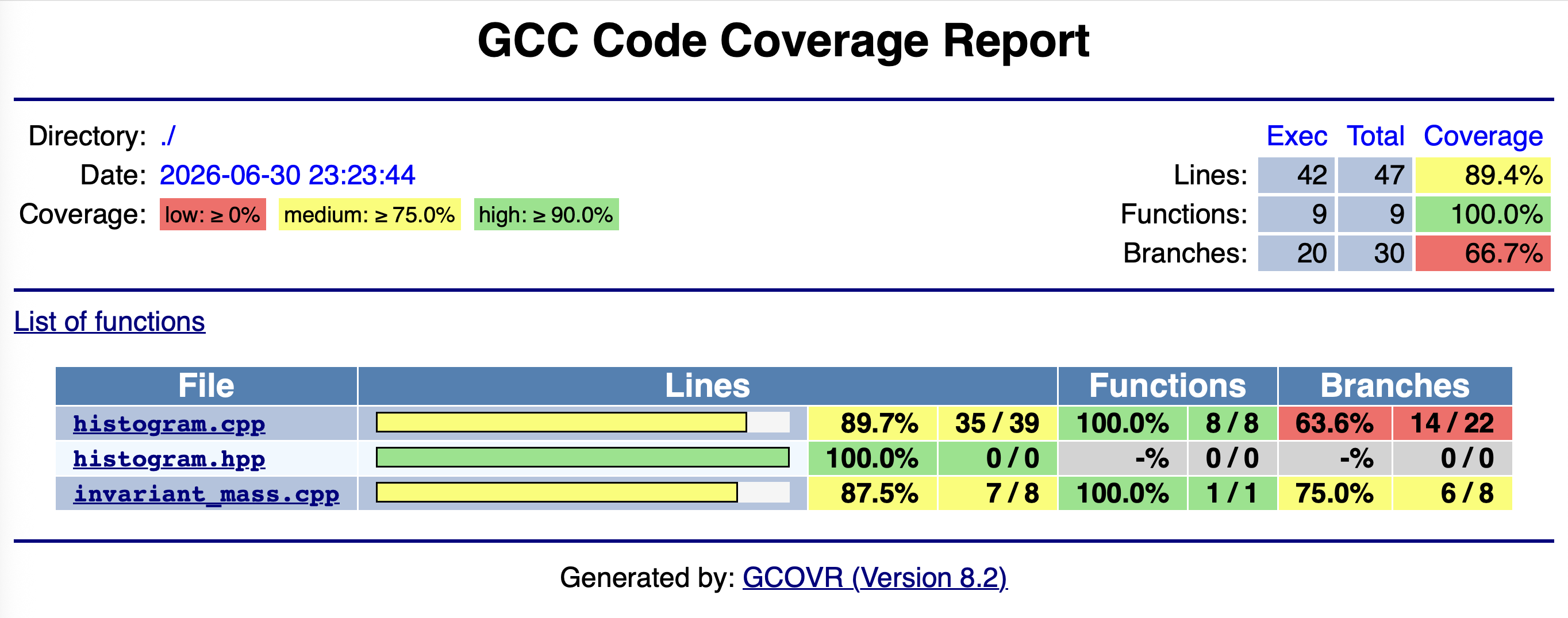
This is basically the same table as printed to terminal, and we see a report for each file under src/:
- Lines: Number of significant lines of code in total and that actually executed.
- Functions: Number of defined functions and how many of these executed.
-
Branches: Similar metric as above, but
branch is quite general here.
- Not just conditionals like
if(), includesfor(),while(), but exception handling, and compiler generated code dealing with them.
- Not just conditionals like
The ratio of actually executed lines/functions/branches to the total
number of each is the coverage for that aspect. We see
that we have 89% line coverage but only 65%
branch coverage of histogram.cpp despite our efforts in
testing, so what’s going on here? Clicking on the filename will take us
to a line-by-line breakdown:
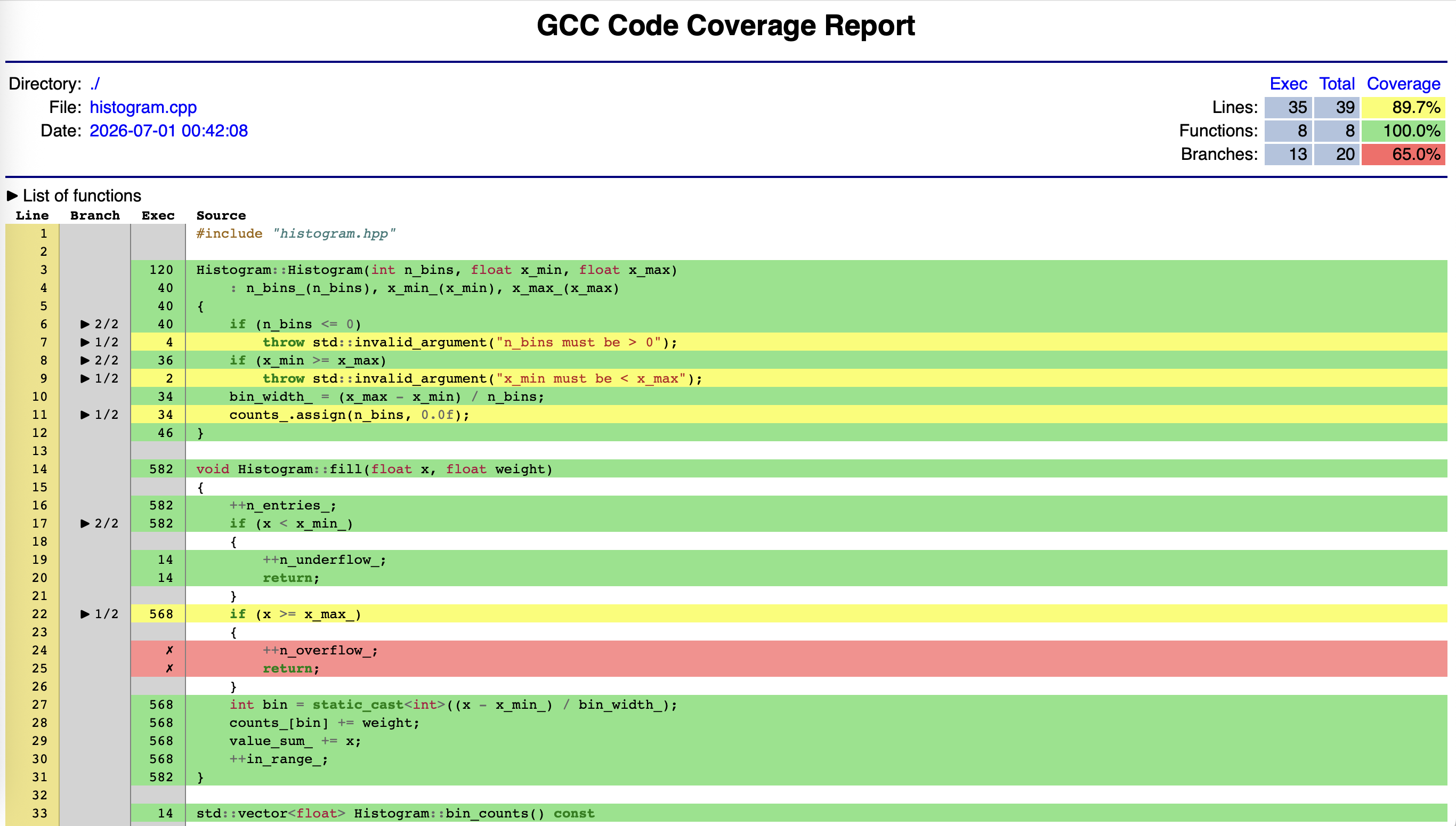
Green lines were executed by at least one test and and red lines were not executed by any test. Yellow lines shows a branch where one or more paths are missing - the branch column shows how many branches within a line were taken. The exec column show the total number of executions of that line.
Missing branches are not necessarily indicative of missing coverage. Look at lines 7, 9, and 34. These are related to the compiler generated code for exception handling - we can see our own branches are covered! This is a general problem with C++, and gcovr’s FAQ covers this in detail.
Allowing for that we can see two definite blocks of red in two different functions that indicate they have not been executed and thus we are missing coverage for them.
Increasing coverage
Challenge
- Look at the HTML coverage report for your
histogram.cppas tested by yourtest_histogram.cpp. If you have red lines, write test(s) that should result in these lines being executed by that test. - Rebuild and rerun the tests to confirm that they pass, then
regenerate the
gcovrHTML report to confirm the line and branch coverage has increased. - Go back to
histogram.hpp. Does your test correspond to testing any part of the documented specification?
-
As written up to this point we have two gaps:
- We had not called
fillwith a value greater than the histogram’s upper edge. - We had not tried to call
meanon an empty histogram.
The simplest tests would be to implement these in our
HistogramFillTestsuite:CPP
TEST_F(HistogramFillTest, ValueBelowXMinIsUnderflow) { h.fill(10.1f); // above x_max — should be underflow EXPECT_EQ(h.n_overflow(), 1); EXPECT_EQ(h.n_entries(), 1); EXPECT_THAT(h.bin_counts(), ::testing::ContainerEq(std::vector<float>(10, 0.0f))); } TEST_F(HistogramFillTest, MeanOnEmptyHistogramThrows) { EXPECT_THROW(h.mean(), std::runtime_error); } - We had not called
You should be able to get the coverage to around 97.4% on lines and 80% on branches. The remaining lines/branches are likely to be related to the compiler problems we noted earlier. Note at this point that even if you added more tests, the coverage would no longer increase - once a line or branch is covered, it’s covered. More testing covering the same code with different inputs increases confidence/robustness, but not coverage.
Yes! The overflow behaviour was described in the
filldocumentation, and that ofmeanin its own specification. It’s very easy to miss small aspects or some subtlely - measuring coverage gives us a helpful check/reminder here, plus a guide back to parts of the specification we might need to revisit.
Traps and pitfalls with Coverage
Coverage is a very helpful metric to measure, but it needs to be used with care and not in isolation. The first point is simple but critical: coverage tells you a line ran, not that it was tested correctly. Think about the following mistake:
CPP
TEST(HistogramBinEdges, BinEdgesAreCorrect) {
    Histogram h(5, 0.0f, 5.0f);
    h.fill(2.5f);
    h.bin_edges();  // no assertion
}
This would give 100% line and branch coverage for
bin_edges but it tests nothing. Coverage
cannot distinguish a test that checks the result from one that merely
calls the function. A line being green means it ran. It does not mean
the result was correct, or that the tests that executed it would catch a
bug there.
The second trap is related - 100% coverage does not mean all inputs are tested. We touched on this already when we talked about floating point numbers when we talked about boundary conditions providing clear areas for testing, and coverage cannot tell you anything about this.
Even a project of this size we’ve seen getting to 100% coverage is tricky given the difficulties inherent in analysing C++ branches noted above. This only gets harder as project sizes increase, but the good news is that getting from 0% to 80% coverage is typically going to catch the most important tests. Getting from 80% to 95% requires more effort for fewer discoveries. Getting from 95% to 100% can require significant work for code paths that are might be genuinely hard to exercise — like error handling for external failures, or defensive checks that should never trigger in correct usage.
- Coverage measures which lines and branches were executed during testing — not whether they were tested correctly
- A line shown as covered means it ran; it does not mean the result was checked or that the test would catch a bug there
- Branch coverage is more informative than line coverage — a line can execute without all its branches being taken
- Coverage is a lower bound on thoroughness, not an upper bound — 100% coverage is necessary but not sufficient
- The coverage report is most useful as a guide to where tests are missing, not as a measure of test quality
- Beware of diminishing returns
Content from Sanitizers as another line of defence
Last updated on 2026-07-01 | Edit this page
Overview
Questions
- The tests all pass — so why does the program crash?
- What classes of bug are invisible to unit tests?
Objectives
- Explain what AddressSanitizer instrument at compile time.
- Build the test executable with sanitizer instrumentation.
- Observe a specific case that all unit tests miss
- Describe the relationship between unit testing, coverage, and sanitizers as complementary tools
Our tests pass, our coverage is high, but are we bug free?
In short, we don’t know there are no bugs, but test coverage gives us increased confidence that at least most lines of code are exercised. Bugs are inevitable, and as we discussed earlier, if a bug does arises we could:
- Write a GoogleTest test case that exposes the bug, i.e. we construct the inputs/state and assert the the expected pass condition. Failure of the test then exposes the bug.
- Diagnose, edit, build, until the test passes.
- The bug is fixed and our test case stays in the suite as a regression test.
Can we give ourselves more warning of obvious problems that tests might not pick up though?
Introducing a deliberate bug
Let’s say we want to tidy up some of the internals of
Histogram, and we decide to store the overflow counts in
the last bin. We naively update fill to do this:
CPP
void Histogram::fill(float x, float weight)
{
    ++n_entries_;
    int bin = static_cast<int>((x - x_min_) / bin_width_);
    if (x < x_min_)
    {
        ++n_underflow_;
        return;
    }
    if (x >= x_max_)
    {
        ++n_overflow_;
        // starting to refactor - store overflow in last element of counts_ vector
        counts_[bin] += 1.0f;
        return;
    }
    counts_[bin] += weight;
    value_sum_ += x;
    ++in_range_;
}
If we recompile, retest and rerun coverage, we will find:
- All the tests pass.
- The coverage remains high, and our line is executed.
Yet we have a genuine (albeit contrived) bug - we are writing to
memory outside of the bounds of counts_ and neither testing
or coverage has picked this up.
Yes, this example is contrived. In practice, bugs like this are more subtle and insidious, but the same principle applies: neither coverage or tests would neccesarily identify the issue.
Code Sanitizers
As with coverage, sanitizers instrument our code with detectors for various types of runtime errors:
- Address: out of bounds reads/writes, leaks.
- Threading: e.g. race conditions.
- Undefined behaviour: e.g. integer overflow, divide-by-zero.
GCC and Clang provide these for us, and like we did for coverage, we need to add the needed compiler and linker flags (sanitizers usually come as a library the compiler will automatically add, but this means the flags also have to be applied at link time). As before, we can use a custom CMake build type to do this:
CMAKE
...
# - C++ Standard setup
set(CMAKE_CXX_STANDARD 17)
set(CMAKE_CXX_STANDARD_REQUIRED ON)
set(CMAKE_CXX_EXTENSIONS OFF)

# - Coverage Build Type flags for C++
set(CMAKE_CXX_FLAGS_COVERAGE "-O0 --coverage")

# - Sanitizer Build Type flags for C++
set(CMAKE_CXX_FLAGS_SANITIZE "-O1 -g -fno-omit-frame-pointer -fsanitize=address")
...-
-O1 -g: Sanitizers do introduce a performance penalty, so we use the lowest level of optimization. This isn’t significant for the tests we write, but is the recommended default. We add debugging so we can get line numbers etc, or to assist debugging when a problem is found. -
-fno-omit-frame-pointer: This gives a cleaner “stack trace” which we’ll see in a bit. -
-fsanitize=address: Enable the address sanitizer. Note that it must appear in both the compiler and linker flags. CMake handles this for us when we set flags like this, but some generators make need extra work (mostly Xcode).
We have deliberately only picked one sanitizer here for simplicity,
and also because whilst GCC and Clang allow you to add multiple
sanitizers -fsanitize=address,thread,... care is needed as
some do not work well together. It’s best to start with one sanitizer
per build type.
To use the “sanitized” build, all we need to do is build and test the project in the needed build mode:
BASH
(ccptepp-test) $ cmake -GNinja -DCMAKE_BUILD_TYPE=Sanitize -S . -B build-sanitize
-- The C compiler identification is AppleClang 17.0.0.17000604
-- The CXX compiler identification is AppleClang 17.0.0.17000604
-- Detecting C compiler ABI info
-- Detecting C compiler ABI info - done
-- Check for working C compiler: /usr/bin/cc - skipped
-- Detecting C compile features
-- Detecting C compile features - done
-- Detecting CXX compiler ABI info
-- Detecting CXX compiler ABI info - done
-- Check for working CXX compiler: /usr/bin/c++ - skipped
-- Detecting CXX compile features
-- Detecting CXX compile features - done
-- Found GTest: /tmp/ccptepp-test/.pixi/envs/default/lib/cmake/GTest/GTestConfig.cmake (found version "1.17.0")
-- Configuring done (0.9s)
-- Generating done (0.0s)
-- Build files have been written to: /tmp/ccptepp-test/build-sanitizeGoogleTest plays nicely with sanitizers (or vice versa), so you don’t need to worry about false positives here.
When we now run the tests, we should get the following, long failure:
BASH
(ccptepp-test) $ ctest -R Hist --output-on-failure --test-dir build-sanitize
Test project /tmp/ccptepp-test/build-sanitize
    Start 2: TestHistogram
1/1 Test #2: TestHistogram ....................Subprocess aborted***Exception:   0.39 sec
Running main() from /Users/runner/miniforge3/conda-bld/gtest-split_1748319995326/work/googletest/src/gtest_main.cc
[==========] Running 21 tests from 3 test suites.
[----------] Global test environment set-up.
[----------] 8 tests from HistogramConstruction
[ RUN      ] HistogramConstruction.ValidParametersDoNotThrow
[       OK ] HistogramConstruction.ValidParametersDoNotThrow (0 ms)
[ RUN      ] HistogramConstruction.NegativeBinsThrows
[       OK ] HistogramConstruction.NegativeBinsThrows (0 ms)
[ RUN      ] HistogramConstruction.ZeroBinsThrows
[       OK ] HistogramConstruction.ZeroBinsThrows (0 ms)
[ RUN      ] HistogramConstruction.IncorrectRangeThrows
[       OK ] HistogramConstruction.IncorrectRangeThrows (0 ms)
[ RUN      ] HistogramConstruction.BinCountsHasCorrectSize
[       OK ] HistogramConstruction.BinCountsHasCorrectSize (0 ms)
[ RUN      ] HistogramConstruction.AllBinsInitiallyZero
[       OK ] HistogramConstruction.AllBinsInitiallyZero (0 ms)
[ RUN      ] HistogramConstruction.BinEdgesHasCorrectSize
[       OK ] HistogramConstruction.BinEdgesHasCorrectSize (0 ms)
[ RUN      ] HistogramConstruction.BinEdgesHaveCorrectExtremes
[       OK ] HistogramConstruction.BinEdgesHaveCorrectExtremes (0 ms)
[----------] 8 tests from HistogramConstruction (0 ms total)

[----------] 8 tests from HistogramFillTest
[ RUN      ] HistogramFillTest.Mean
[       OK ] HistogramFillTest.Mean (0 ms)
[ RUN      ] HistogramFillTest.SingleFillIncreasesCorrectBin
[       OK ] HistogramFillTest.SingleFillIncreasesCorrectBin (0 ms)
[ RUN      ] HistogramFillTest.SingleFillLeavesOtherBinsZero
[       OK ] HistogramFillTest.SingleFillLeavesOtherBinsZero (0 ms)
[ RUN      ] HistogramFillTest.ValueBelowXMinIsUnderflow
[       OK ] HistogramFillTest.ValueBelowXMinIsUnderflow (0 ms)
[ RUN      ] HistogramFillTest.MultipleWeightedFillsAccumulate
[       OK ] HistogramFillTest.MultipleWeightedFillsAccumulate (0 ms)
[ RUN      ] HistogramFillTest.NEntriesCountsAllFillsRegardlessOfWeight
[       OK ] HistogramFillTest.NEntriesCountsAllFillsRegardlessOfWeight (0 ms)
[ RUN      ] HistogramFillTest.MeanOfSymmetricFillsIsNearCentre
[       OK ] HistogramFillTest.MeanOfSymmetricFillsIsNearCentre (0 ms)
[ RUN      ] HistogramFillTest.MeanExcludesUnderflowValues
[       OK ] HistogramFillTest.MeanExcludesUnderflowValues (0 ms)
[----------] 8 tests from HistogramFillTest (0 ms total)

[----------] 5 tests from LinearHistogramTest
[ RUN      ] LinearHistogramTest.TotalEntryCount
=================================================================
==61793==ERROR: AddressSanitizer: heap-buffer-overflow on address 0x6040000021bc at pc 0x00010091a27c bp 0x00016f4fe810 sp 0x00016f4fe808
READ of size 4 at 0x6040000021bc thread T0
    #0 0x00010091a278 in Histogram::fill(float, float) histogram.cpp:27
    #1 0x000100a62290 in void testing::internal::HandleExceptionsInMethodIfSupported<testing::Test, void>(testing::Test*, void (testing::Test::*)(), char const*)+0xb4 (libgtest.1.17.0.dylib:arm64+0x22290)
    #2 0x000100a620d4 in testing::Test::Run()+0x80 (libgtest.1.17.0.dylib:arm64+0x220d4)
    #3 0x000100a63648 in testing::TestInfo::Run()+0x160 (libgtest.1.17.0.dylib:arm64+0x23648)
    #4 0x000100a648f4 in testing::TestSuite::Run()+0x3a4 (libgtest.1.17.0.dylib:arm64+0x248f4)
    #5 0x000100a7661c in testing::internal::UnitTestImpl::RunAllTests()+0x6d8 (libgtest.1.17.0.dylib:arm64+0x3661c)
    #6 0x000100a75db0 in bool testing::internal::HandleExceptionsInMethodIfSupported<testing::internal::UnitTestImpl, bool>(testing::internal::UnitTestImpl*, bool (testing::internal::UnitTestImpl::*)(), char const*)+0xb4 (libgtest.1.17.0.dylib:arm64+0x35db0)
    #7 0x000100a75ca8 in testing::UnitTest::Run()+0x88 (libgtest.1.17.0.dylib:arm64+0x35ca8)
    #8 0x000100967e80 in main+0x50 (libgtest_main.1.17.0.dylib:arm64+0x3e80)
    #9 0x000194d4eb94  (<unknown module>)

0x6040000021bc is located 4 bytes after 40-byte region [0x604000002190,0x6040000021b8)
allocated by thread T0 here:
    #0 0x000101107428 in _Znwm+0x74 (libclang_rt.asan_osx_dynamic.dylib:arm64e+0x4b428)
    #1 0x000100919c6c in std::__1::vector<float, std::__1::allocator<float>>::assign(unsigned long, float const&) vector.h:1076
    #2 0x000100919ac0 in Histogram::Histogram(int, float, float) histogram.cpp:11
    #3 0x00010090dabc in testing::internal::TestFactoryImpl<LinearHistogramTest_TotalEntryCount_Test>::CreateTest() gtest-internal.h:448
    #4 0x000100a63a40 in testing::Test* testing::internal::HandleExceptionsInMethodIfSupported<testing::internal::TestFactoryBase, testing::Test*>(testing::internal::TestFactoryBase*, testing::Test* (testing::internal::TestFactoryBase::*)(), char const*)+0xb4 (libgtest.1.17.0.dylib:arm64+0x23a40)
    #5 0x000100a6362c in testing::TestInfo::Run()+0x144 (libgtest.1.17.0.dylib:arm64+0x2362c)
    #6 0x000100a648f4 in testing::TestSuite::Run()+0x3a4 (libgtest.1.17.0.dylib:arm64+0x248f4)
    #7 0x000100a7661c in testing::internal::UnitTestImpl::RunAllTests()+0x6d8 (libgtest.1.17.0.dylib:arm64+0x3661c)
    #8 0x000100a75db0 in bool testing::internal::HandleExceptionsInMethodIfSupported<testing::internal::UnitTestImpl, bool>(testing::internal::UnitTestImpl*, bool (testing::internal::UnitTestImpl::*)(), char const*)+0xb4 (libgtest.1.17.0.dylib:arm64+0x35db0)
    #9 0x000100a75ca8 in testing::UnitTest::Run()+0x88 (libgtest.1.17.0.dylib:arm64+0x35ca8)
    #10 0x000100967e80 in main+0x50 (libgtest_main.1.17.0.dylib:arm64+0x3e80)
    #11 0x000194d4eb94  (<unknown module>)

SUMMARY: AddressSanitizer: heap-buffer-overflow histogram.cpp:27 in Histogram::fill(float, float)
Shadow bytes around the buggy address:
  0x604000001f00: fa fa fd fd fd fd fd fa fa fa fd fd fd fd fd fa
  0x604000001f80: fa fa fd fd fd fd fd fa fa fa fd fd fd fd fd fa
  0x604000002000: fa fa fd fd fd fd fd fa fa fa fd fd fd fd fd fa
  0x604000002080: fa fa fd fd fd fd fd fa fa fa fd fd fd fd fd fa
  0x604000002100: fa fa fd fd fd fd fd fa fa fa fd fd fd fd fd fa
=>0x604000002180: fa fa 00 00 00 00 00[fa]fa fa 00 00 00 00 00 fa
  0x604000002200: fa fa fa fa fa fa fa fa fa fa fa fa fa fa fa fa
  0x604000002280: fa fa fa fa fa fa fa fa fa fa fa fa fa fa fa fa
  0x604000002300: fa fa fa fa fa fa fa fa fa fa fa fa fa fa fa fa
  0x604000002380: fa fa fa fa fa fa fa fa fa fa fa fa fa fa fa fa
  0x604000002400: fa fa fa fa fa fa fa fa fa fa fa fa fa fa fa fa
Shadow byte legend (one shadow byte represents 8 application bytes):
  Addressable:           00
  Partially addressable: 01 02 03 04 05 06 07
  Heap left redzone:       fa
  Freed heap region:       fd
  Stack left redzone:      f1
  Stack mid redzone:       f2
  Stack right redzone:     f3
  Stack after return:      f5
  Stack use after scope:   f8
  Global redzone:          f9
  Global init order:       f6
  Poisoned by user:        f7
  Container overflow:      fc
  Array cookie:            ac
  Intra object redzone:    bb
  ASan internal:           fe
  Left alloca redzone:     ca
  Right alloca redzone:    cb
==61793==ABORTING


0% tests passed, 1 tests failed out of 1

Total Test time (real) =   0.40 sec

The following tests FAILED:
	  2 - TestHistogram (Subprocess aborted)
Errors while running CTest
The good news is that we have an error, which is what we wanted, but how to make sense of the output? It’s scarier than it looks as the santizer has printed:
BASH
SUMMARY: AddressSanitizer: heap-buffer-overflow histogram.cpp:27 in Histogram::fill(float, float)That alone is sufficient to pin point the error in our simple case, but if we needed further triage, we get a full stack trace of the fault, starting at
==61793==ERROR: AddressSanitizer: heap-buffer-overflow on address 0x6040000021bc at pc 0x00010091a27c bp 0x00016f4fe810 sp 0x00016f4fe808
READ of size 4 at 0x6040000021bc thread T0
    #0 0x00010091a278 in Histogram::fill(float, float) histogram.cpp:27
Usually the first (zeroth) stack frame contains the exact
source, but if the error is dependent
on previous calls, you have that information to aid triage.
Hopefully, using documented specifications, writing good tests, and ensuring they cover the code well will prevent a high fraction of problems occuring. Using sanitizers provides one extra layer of defence (largely against ourselves!).
- Unit tests check that your code does what you intended; sanitizers check for errors your intentions did not anticipate
- A test suite that is green and fully covered can still contain memory errors and undefined behaviour
- AddressSanitizer detects out-of-bounds memory access and use-after-free at runtime — errors that produce no compiler warning and may crash only rarely in production
- Sanitizers diagnose bugs that already exist; a well-chosen test prevents their reintroduction
- No single tool is sufficient — unit tests, coverage measurement, and sanitizers answer different questions and catch different bugs; together they give you the best practical assurance that your code is correct